Most machine shops train new operators the same way: pair them with whoever is free and hope it sticks. Sometimes that works. Often the new hire picks up one person’s shortcuts, misses a step nobody thought to mention, and the senior machinist loses hours of spindle time answering the same questions every week.
A good CNC operator training program fixes that. It does not need a classroom or a training department. It needs your procedures written down, a clear order to learn them in, a way to check that people actually learned, and a record of who is trained on what. This guide walks through how to build one in a working shop.
Why Shadowing Alone Falls Short
Learning next to an experienced machinist is valuable, and it should stay part of training. The trouble starts when it is the only method.
- Every trainer teaches it differently. Two operators trained by two different people will set up the same job two different ways, and both will think their way is the standard.
- Knowledge stays in one head. When the only person who knows a setup is on vacation or leaves, that job slows down or stops.
- The best people get pulled off the machines. Every hour spent re-explaining a basic procedure is an hour that machinist is not running parts.
- Nothing is recorded. When a customer, an auditor, or your own quality manager asks who was trained on a process and when, there is no answer beyond memory.
None of these are a people problem. They are a structure problem, and structure is something you can build.
Step 1: Write Down the Procedures That Matter Most
Start with the work that causes the most trouble when it is done wrong. For most shops that list includes shop safety, machine warm-up and daily maintenance, loading programs and setting work offsets, tool changes and touch-offs, reading a job traveler or work order, first piece checks, and what to do when a part is out of tolerance.
Have your most experienced operator walk through each procedure while someone else writes it down step by step. Take photos of the machine control, the fixture, and the gauges at each step. Keep the language plain, and write it the way your floor actually talks.
Do not try to document everything in the first month. Ten solid procedures that people use are worth more than a binder of fifty that nobody opens.
Step 2: Build a Training Path for Each Role
A new deburr hand, a CNC operator, and a setup machinist need different things. Group your procedures into a path for each role, in the order someone should learn them. A typical CNC operator path might look like this:
- Shop safety basics and PPE
- Reading job travelers and drawings
- Daily machine maintenance and warm-up
- Loading parts and running a proven program
- Measuring parts and recording inspection results
- Basic tool changes and offsets
- Handling alarms and when to call for help
Setup machinists build on that path with fixturing, program prove-out, and first article work. Keeping the paths separate means a new operator is not buried in material they will not need for months.
Step 3: Pair Written Training With Hands-On Time
Written procedures do not replace time at the machine. They make that time better. When the new hire has already read the steps for a tool change and seen the photos, the time with the senior machinist goes to the parts that need a person: feel, judgment, and the quirks of a specific machine.
A simple pattern works well: read the procedure, watch it done once, do it with someone watching, then do it alone. Sign it off only after that last stage.
Step 4: Check Understanding, Not Just Attendance
Having read a procedure is not the same as knowing it. Add a short test at the end of key courses. A few multiple choice questions on safety, a short answer on what to check before pressing cycle start, or a photo upload of a correctly set work offset all tell you more than a signature on a sheet.
For the procedures that touch quality, connect training to the inspection forms your operators fill out on the job. If an operator is going to record first piece measurements, they should be trained on that form before they ever see a live job.
Step 5: Keep a Record of Who Is Trained on What
Training records answer practical questions. Who can run the five-axis cell on second shift? Who still needs the new deburr procedure? Is the person running this aerospace job trained on the inspection steps? Quality systems such as AS9100 and ISO 9001 also expect you to show evidence of competence for people doing work that affects product quality.
At minimum, record each person, each course or procedure, the date completed, and any test result. A spreadsheet can work for a very small shop, but it goes stale fast, because nobody updates it on the floor.
Step 6: Make Training Easy to Reach on the Floor
If training lives in an office computer or a binder in the front office, operators will not use it during a shift. Put procedures where the work happens. A shared tablet at a workcenter lets an operator pull up the steps for a setup right before they do it, which turns training material into everyday work instructions.
Think about temporary and part-time staff too. They often need training the most and are the least likely to have a software login.
Step 7: Review and Update
Processes change. A new machine arrives, a fixture gets redesigned, a customer changes a requirement. Assign an owner to each procedure and review it when the process changes, not just once a year. When a part goes wrong because a step was missed, ask whether the procedure needs a fix before blaming the person.
Questions to Ask About Training Software for Your Shop
- Can we build courses from our own procedures, with steps and photos?
- Can operators resume a course where they left off?
- Can we add tests and issue a certificate when someone passes?
- Can floor and temporary staff train on a shop tablet without a full account?
- Can we assign training to teams or departments and see who has finished?
- Do training files live with the same documents operators use on jobs?
How ShopXpert Handles CNC Operator Training
ShopXpert has been building shop management software for machine shops since 2020, and training lives in the same system as your jobs, quality, and people. With ShopXpert training and knowledge management, you can:
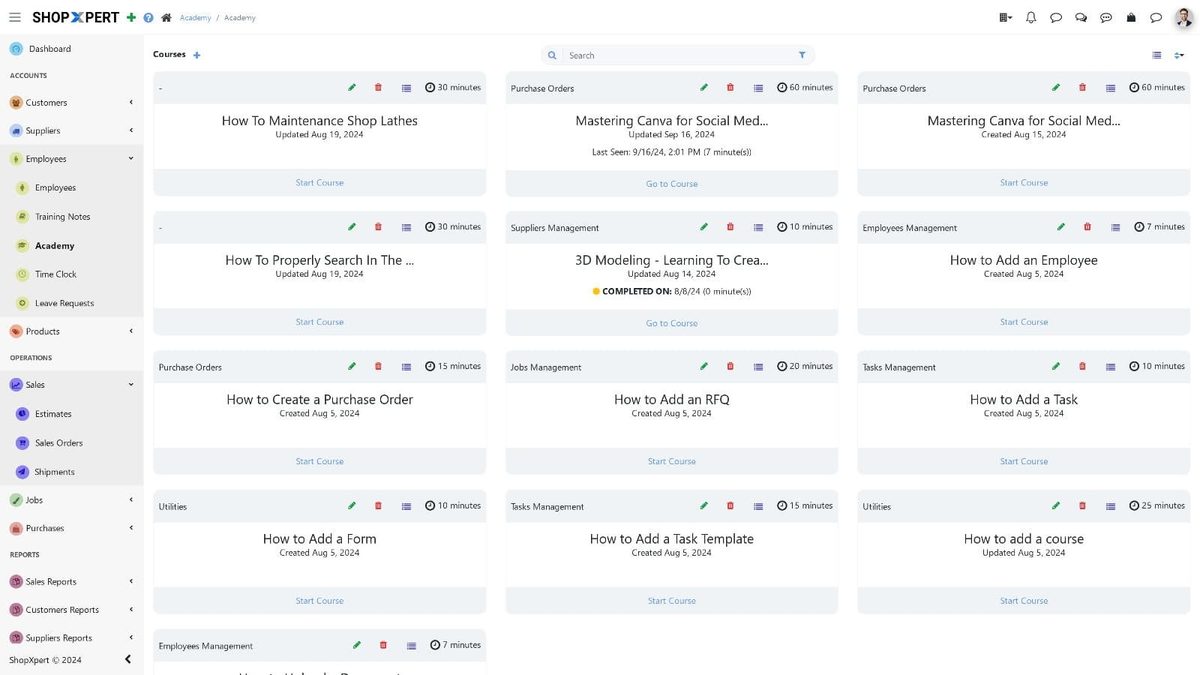
- Build courses in the Academy. Organize courses in categories, break them into steps with images and estimated minutes, and let employees resume where they left off. ShopXpert tracks time spent and status: not started, started, or completed on a date.
- Test and certify. Add a test built with Forms, using multiple choice, short answers, and file uploads, and issue a certificate of completion.
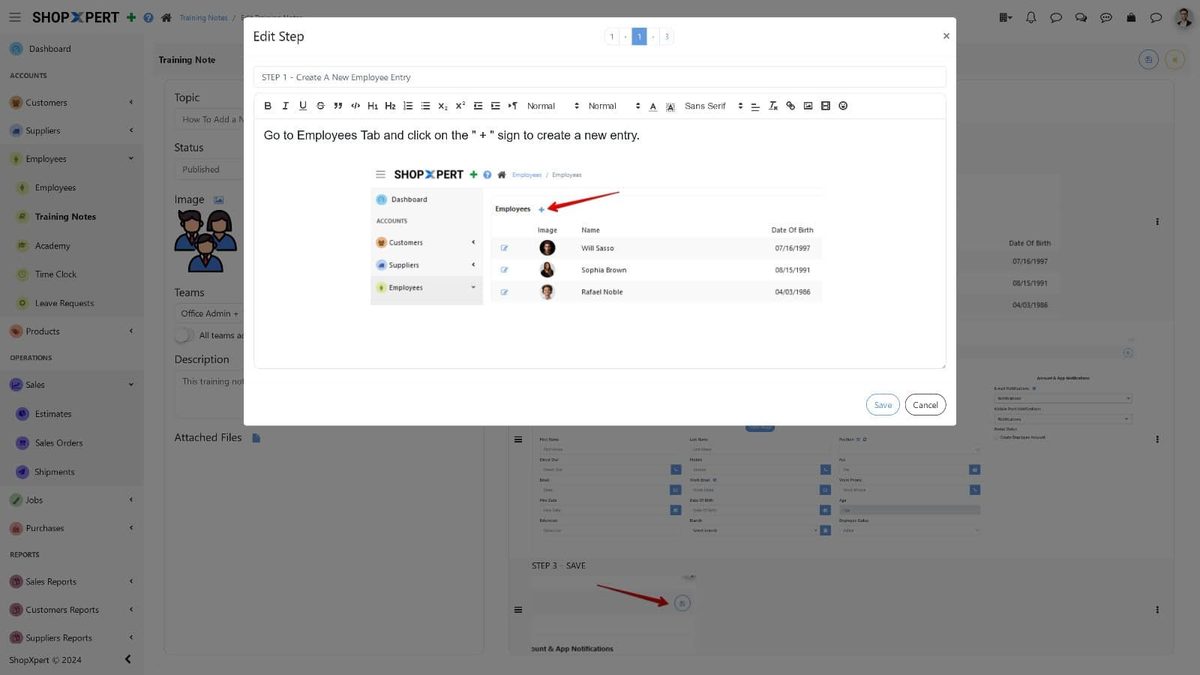
- Write training notes. Create step-by-step notes with images and attachments, publish them, assign them to teams, and track completion.
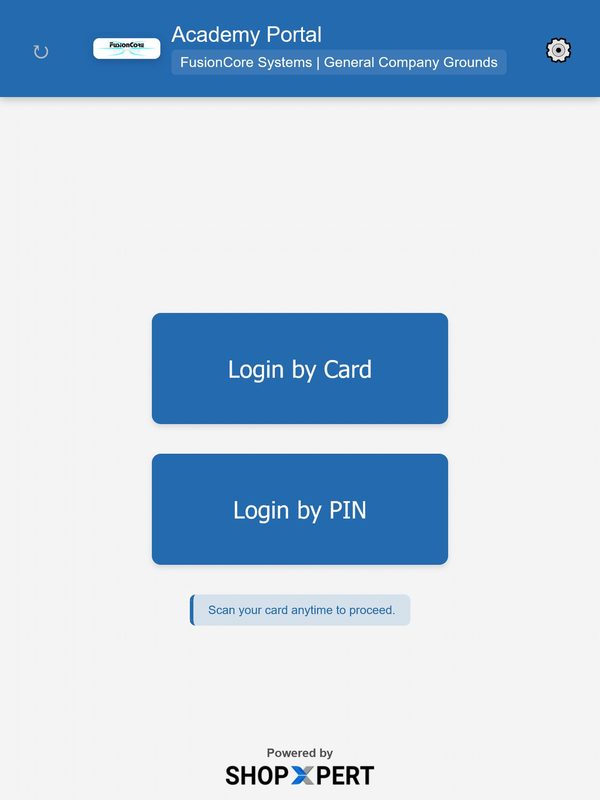
- Train on the floor. The Academy Portal turns a shop tablet or workstation into a training terminal where employees log in by RFID card or PIN, without a full ShopXpert account, and see the training for their department or role.
- Keep documents in one place. ShopXpert Storage holds files from jobs, suppliers, maintenance, and training, so instructions link to the same files operators use on the job.
Training also connects to the rest of the shop. Inspection forms for first article, in-process, and final checks are built in quality and traceability, jobs and workstation queues run in production management, and labor is tracked with workforce time tracking, all on the same ShopXpert platform.
If your shop still runs on paper travelers, our post on the real cost of job travelers is a good next read. For keeping training records audit-ready, see our guide to AS9100 traceability requirements.
Get Know-How Out of One Person’s Head
Pick one procedure that only one person in your shop really knows. Book a ShopXpert demo and we will show you how to turn it into a course your next hire can follow.