
Solutions / Manufacturing ERP

Manufacturing ERP That Tells You If a Job Is Making Money Before It Ships.

Most shops find out a job lost money after it is invoiced. ShopXpert manufacturing ERP connects quotes, jobs, labor, materials, purchasing, and scheduling to live production data, so you see margins, delays, and shortages while there is still time to act.

Quote to invoice in one systemLive estimate vs actualSyncs with QuickBooks
QUOTE Q-2318$18,400Estimated job costWONJOB 1842ReleasedRouted to 4 workstationsLABOR$6,120MATERIAL$4,880OUTSIDE$1,690LIVE MARGINJob 184231%Estimate$18,400Actual so far$12,690ON BUDGETKnow the margin while the job runsCosts post to the job as work happens.
Sound Familiar?

Four Problems a Manufacturing ERP Should Solve.

If any of these happen in your shop every week, the issue is not effort. It is information that lives in too many places.

We find out a job lost money after it ships.
With ShopXpertLive job costing compares estimated and actual labor, material, and outside costs while the job is still on the floor.
Quoting takes a day because nobody trusts last time’s numbers.
With ShopXpertCosting tools and estimate-vs-actual history make the next quote faster and closer to reality.
The schedule lives in a spreadsheet only one person understands.
With ShopXpertPlanning puts jobs, machines, and people on one board, with times based on real availability.
The office and the floor keep retyping the same information.
With ShopXpertOne record follows the work from RFQ to quote, sales order, job, purchase order, and invoice.
Quoting

The problemTwo estimators price the same part differently, and neither knows what the last one really cost.

Quote From Real Costs, Then Turn the Quote Into the Job.

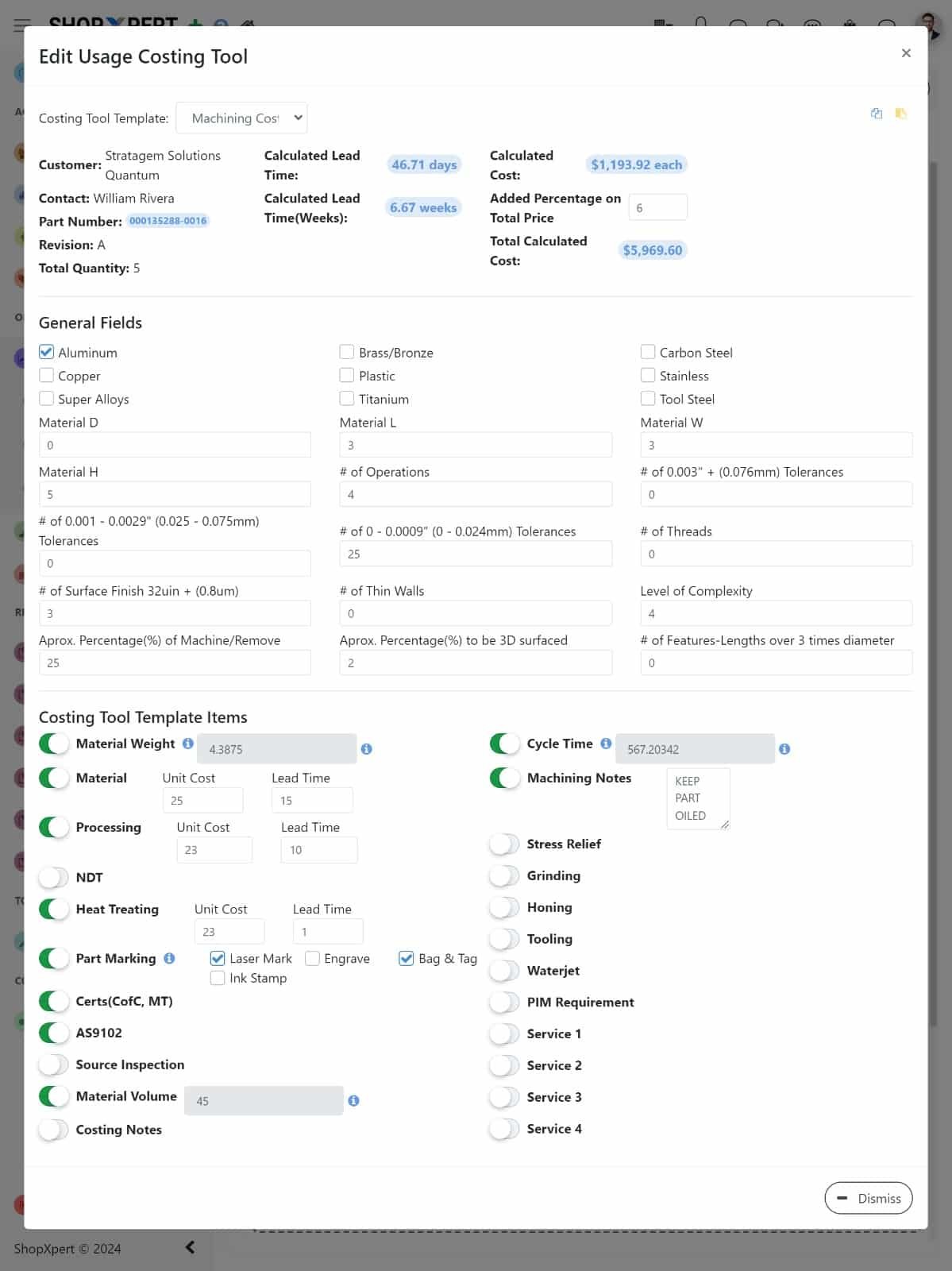
Build estimates with costing tools that include materials, labor, outside processing, and overhead, with your own formulas and fields. Keep revisions, send a professional quote, and compare it against what similar jobs actually cost.

When the customer approves, the quote becomes a sales order and a routed job in one step. Nobody types the part, quantities, or prices again.

  • Custom costing tools and formulas
  • Quote revisions and approval history
  • Approved quote converts to sales order and job
  • Estimate vs actual from past jobs
Costing Tool
Manufacturing ERP costing tool in ShopXpert with material, labor, and overhead fields for a job estimate
Job 1842
ShopXpert manufacturing ERP job detail screen with stages, tasks, files, and job status
Job Costing

The problemHours and material usage are written on paper and entered days later, if they are entered at all.

See Estimate vs Actual While the Job Is Still Running.

Operators record time against the job at their workstation, material is issued from inventory to the job, and outside processing purchase orders are tied to the same record. Costs add up as the work happens.

Managers see which jobs are on budget, which are drifting, and why, before the parts ship and the margin is locked in.

  • Labor captured at the workstation
  • Material and outside costs posted to the job
  • Stages, tasks, and deadlines per job
  • Job history for the next quote
Scheduling

The problemA rush order comes in and nobody can say what it will push back.

Plan Jobs Around Real Machine and People Availability.

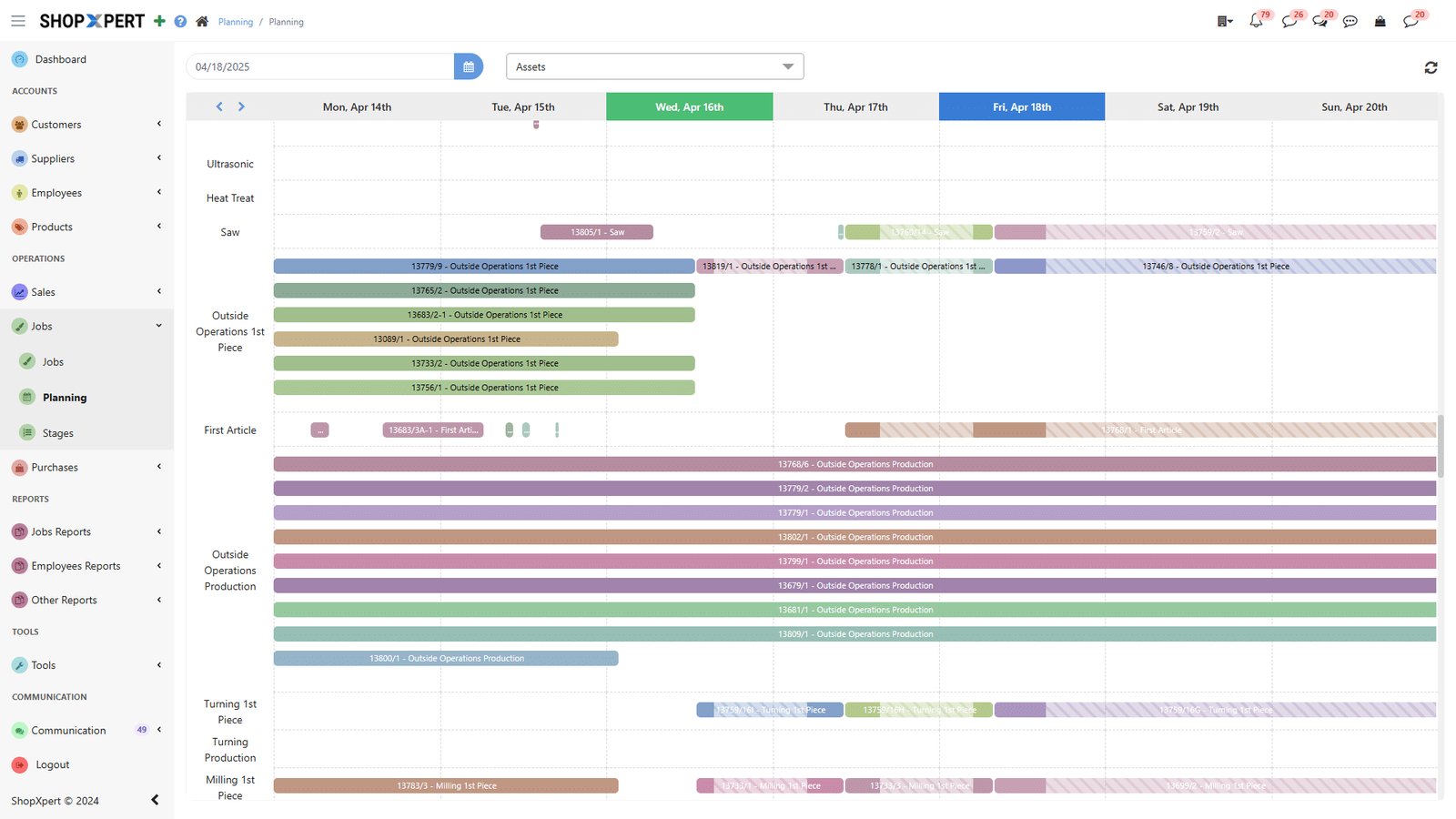
Drag jobs on a Gantt board and let ShopXpert set start and end times based on machine and employee availability. Link dependent steps, compare planned against actual, and spot the bottleneck before it stops the floor.

The same plan feeds the workstations, so operators always see the next job in the right order. See how it works in production management.

  • Drag-and-drop Gantt planning
  • Start and end times from real availability
  • Task dependencies
  • Planned vs actual and bottleneck view
Planning
ShopXpert production planning Gantt chart scheduling jobs across machines and employees
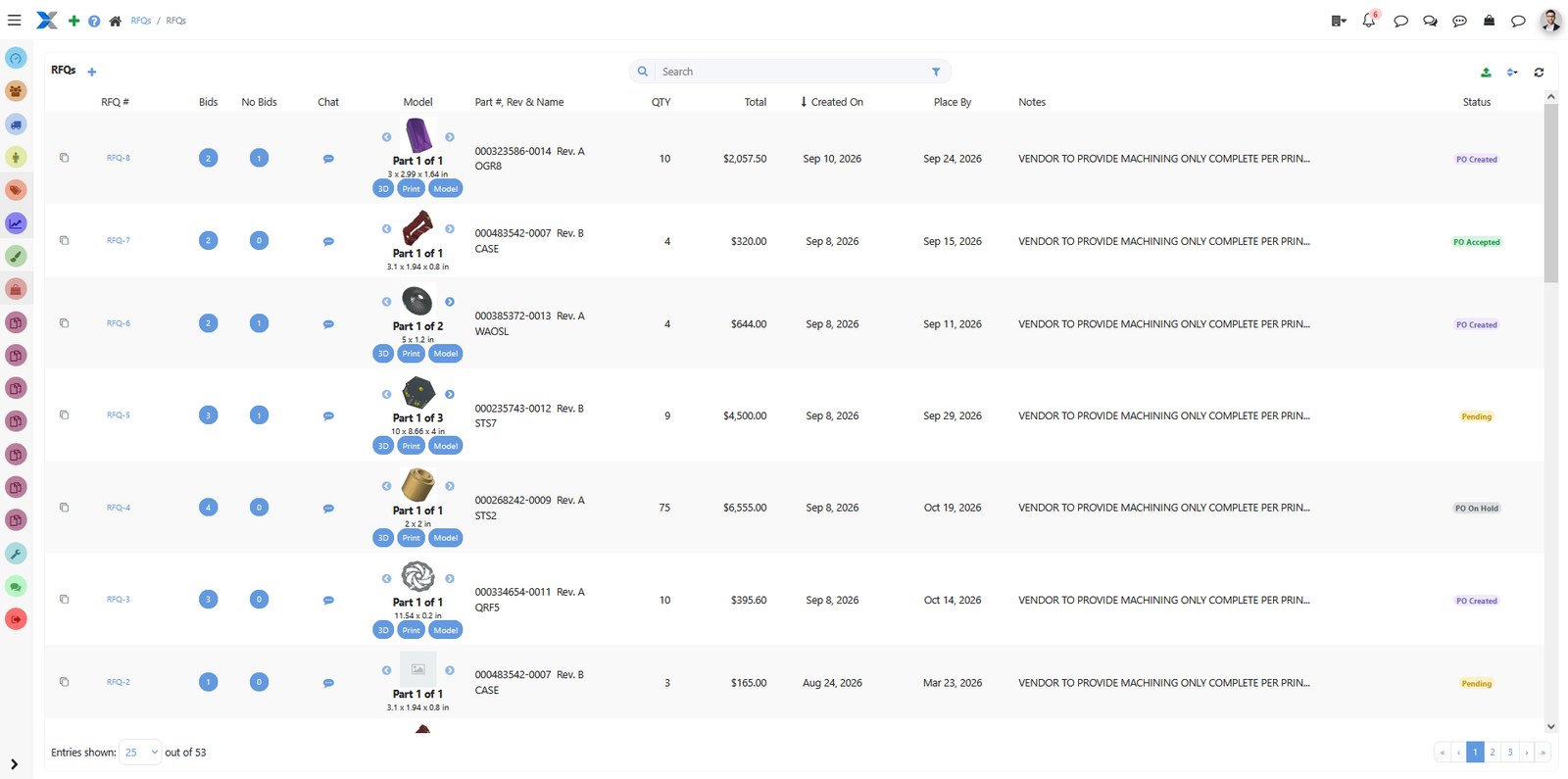
RFQs
Manufacturing ERP RFQ list in ShopXpert with part models, bids, no-bids, totals, and PO status
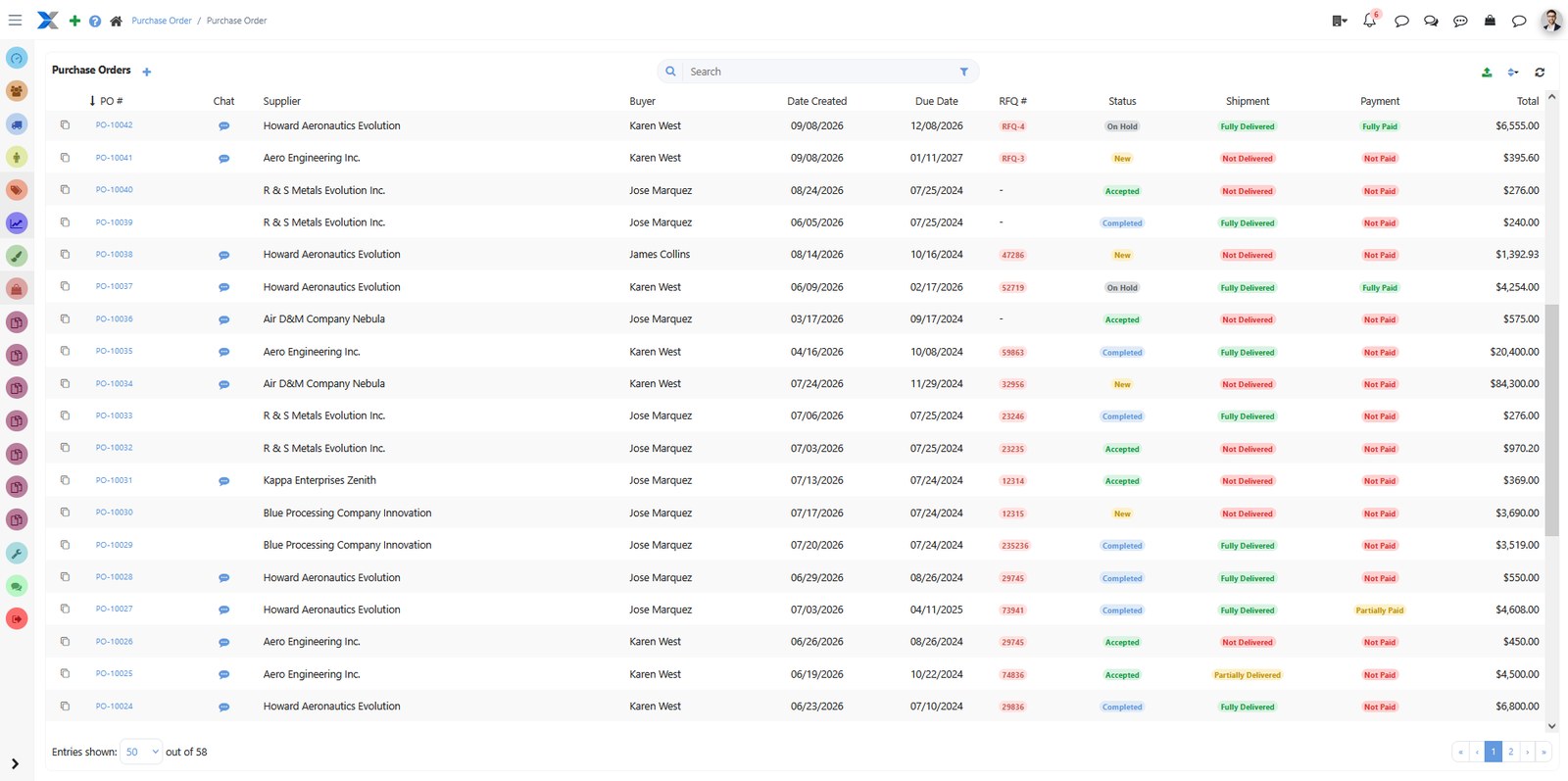
Purchase Orders
ShopXpert purchase orders with supplier, buyer, RFQ, status, shipment, payment, and total
Purchasing and Accounting

The problemPurchasing, receiving, and invoicing happen in three places, and the numbers never quite match.

Buy, Receive, Invoice, and Sync to QuickBooks From the Same Job.

Create purchase orders from supplier RFQs, reserve inventory for production, and track suppliers with scorecards. When the job ships, create the invoice in ShopXpert.

The QuickBooks integration syncs invoices, purchase orders, customers, suppliers, items, time entries, and job costs. ShopXpert runs operations and QuickBooks keeps the books.

  • Purchase orders from supplier RFQs
  • Inventory reserved for production
  • Supplier scorecards and outsource tracking
  • Two-way QuickBooks sync
How It Works

From Quote to Invoice Without Losing the Numbers.

Every step adds to the same job record, so the margin you quoted is the margin you can check.

01

QuotePrice the job with costing tools and send a professional estimate.

02

Release the JobConvert the approved quote into a sales order and a routed job.

03

Track Costs LiveLabor, material, and outside processing post to the job as work happens.

04

Invoice and SyncShip, invoice, and sync the numbers to QuickBooks.

Live Job CostingJOB 1842 · Bracket, Qty 40
LIVE
Estimate$18,400
Actual so far$12,690
Margin31%
Labor$6,120
Material$4,880
Outside$1,690
Machine time31.5 h
EstimatedActual
Job progress · Op 30 of 5064%
On budgetOutside process 3% over estimate
What Changes

What Shops Get From One Manufacturing ERP.

Fewer surprises at the end of the job, and fewer hours spent chasing information.

Margins You Can Trust

Estimate vs actual on every job, not a guess at month end.

Faster, Consistent Quotes

Costing tools and job history keep every estimator on the same numbers.

One Version of the Schedule

Office and floor work from the same plan and priorities.

No Double Entry

Data entered once flows from RFQ to invoice and into QuickBooks.

FAQ

Manufacturing ERP Questions.

Still deciding? Talk to our team about your shop.

What is manufacturing ERP?

Manufacturing ERP (enterprise resource planning) is software that connects quoting, jobs, scheduling, inventory, purchasing, labor, and costing in one system. ShopXpert is built for job shops and contract manufacturers, so the shop floor and the office share the same live data. See the general definition of enterprise resource planning.

Does ShopXpert replace QuickBooks?

No. ShopXpert runs operations and QuickBooks keeps handling accounting. Customers, suppliers, products, and tax codes import from QuickBooks once, then invoices, purchase orders, time entries, and job costs sync from ShopXpert.

How does ShopXpert track job costs?

Labor is recorded at the workstation, material is issued from inventory to the job, and outside processing purchase orders are tied to the job. Actual costs are compared with the estimate while the job is running.

Do we have to use every module?

No. ShopXpert is modular. Start with the areas that hurt most, such as quoting and jobs, and add inventory, quality, or maintenance later.

Can we move from our current ERP?

Yes. See how switching to ShopXpert works, including data migration and training.

Manufacturing ERP

Find Out Which Jobs Make Money While You Can Still Change the Outcome.

See ShopXpert running with your own jobs, routings, and costs.