
Solutions / CMMS and Maintenance

Preventive Maintenance Software That Catches Problems Before Your Machines Do.

In most shops, maintenance happens after something breaks. ShopXpert preventive maintenance software schedules recurring work, assigns it to the right people, keeps the conversation on the task, and closes every job with a custom form and a signature.

Recurring tasks that schedule themselvesChat on every taskCustom forms with signatures
RECURRINGWeekly · Monthly · HoursPM-104 · CNC MILL 3Spindle and coolant checkDUE TODAYJRASSIGNED TOJ. Rivera · MaintenanceCoolant topped off, filter replaced.Thanks, photo attached to the task.MAINTENANCE FORM8 / 8 checks · SignedMaintenance that schedules itselfRecurring tasks, owners, chat, and signed forms in one place.
Sound Familiar?

Why Maintenance Slips Without Preventive Maintenance Software.

Breakdowns rarely come from a lack of skill. They come from work nobody scheduled, owned, or recorded.

Maintenance only happens when a machine stops.
With ShopXpertRecurring tasks put preventive work on the calendar every day, week, month, or year.
Everyone thought someone else was changing the coolant.
With ShopXpertEvery task has an owner, a due date, a priority, and a status the whole team can see.
The details are lost in texts, calls, and sticky notes.
With ShopXpertThe conversation lives on the task, with comments and photos kept in its history.
Paper checklists get skipped, and nobody can prove the work was done.
With ShopXpertCustom forms with pass/fail checks, photos, and signatures close every task with proof.
Recurring Tasks

The problemPreventive work depends on someone remembering it, so it is the first thing to slip when the shop gets busy.

Put Preventive Maintenance on a Schedule That Runs Itself.

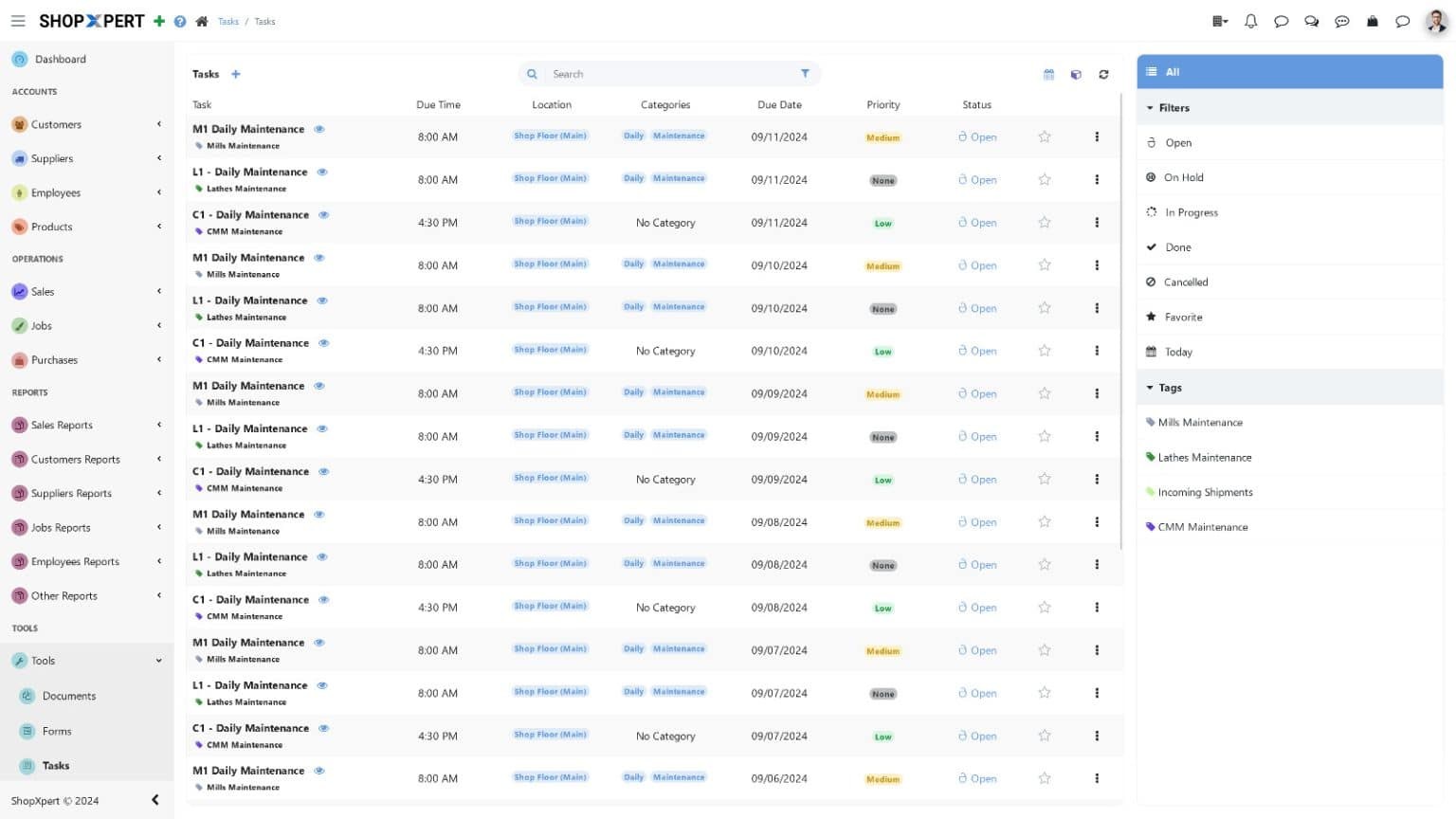
Create a task once and set it to repeat daily, weekly, monthly, or yearly. ShopXpert creates the next occurrence on time, with the right checklist, priority, and deadline.

Link tasks to machines, locations, categories, and suppliers, and use templates for the jobs you repeat across equipment. Alerts flag work that is overdue, blocked, on hold, or done.

  • Daily, weekly, monthly, or yearly recurrence
  • Task templates for repeat maintenance
  • Priority, deadline, and one-click status
  • Alerts for overdue and blocked work
Recurring Tasks
Preventive maintenance software task list in ShopXpert with recurring maintenance tasks, priorities, due dates, and statuses
Assignment
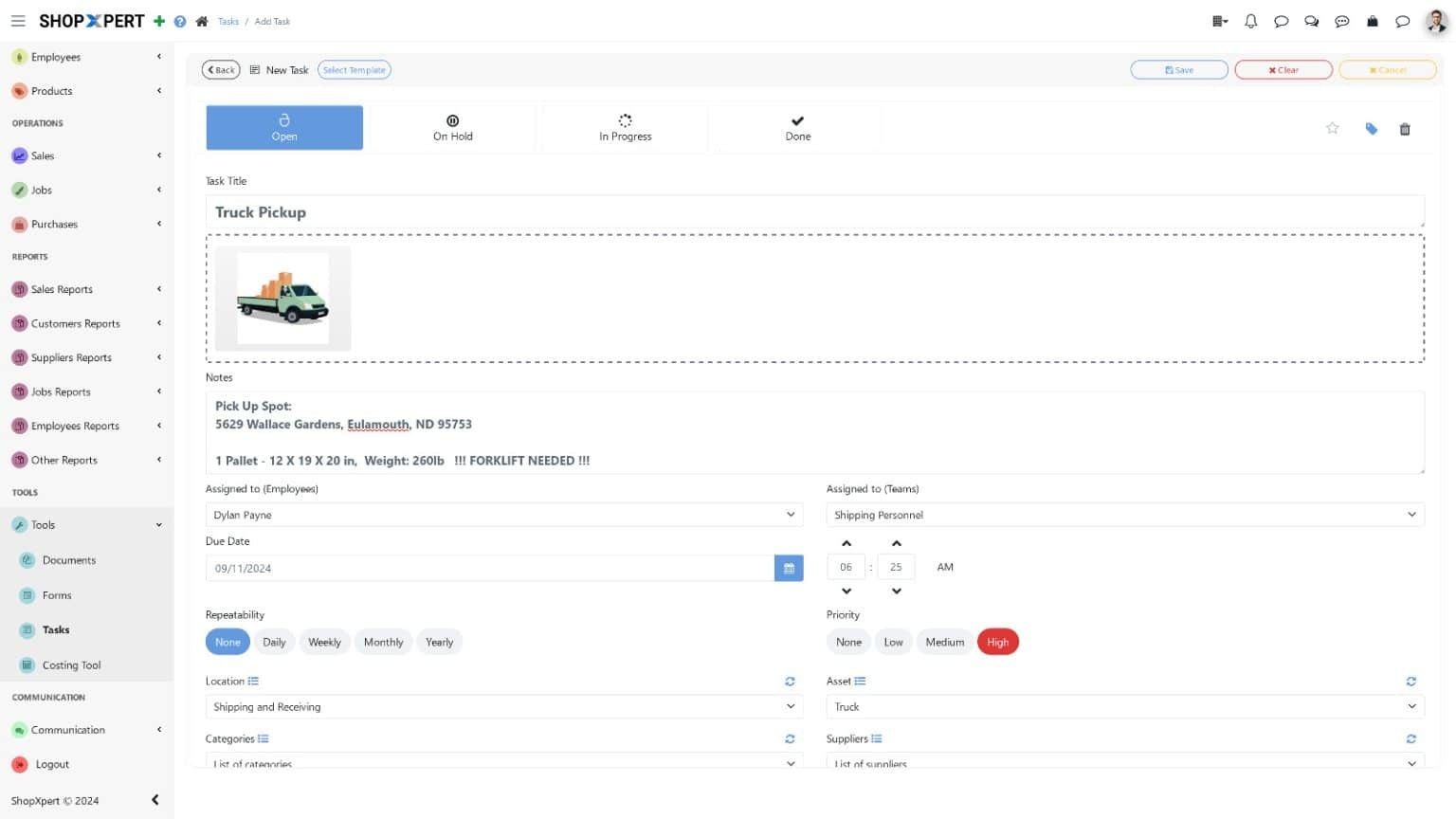
ShopXpert maintenance task assigned to an employee with due date, priority, and status
Assignment

The problemWhen a task belongs to everyone, it belongs to no one.

Every Task Has an Owner, a Deadline, and a History.

Assign each task to an employee or a team. Technicians see their work on desktop or in the mobile app, and managers see what is open, in progress, on hold, or done.

Add QR codes to your machines, so anyone can scan one to open its tasks, manuals, forms, and maintenance history on the spot.

  • Assign to employees or teams
  • Mobile access for technicians
  • QR codes on machines
  • Full task archive by date range
In-App Messenger

The problemThe technician texts the supervisor, the supervisor forwards it, and the answer never reaches the record.

Keep the Conversation on the Task, Not in Text Messages.

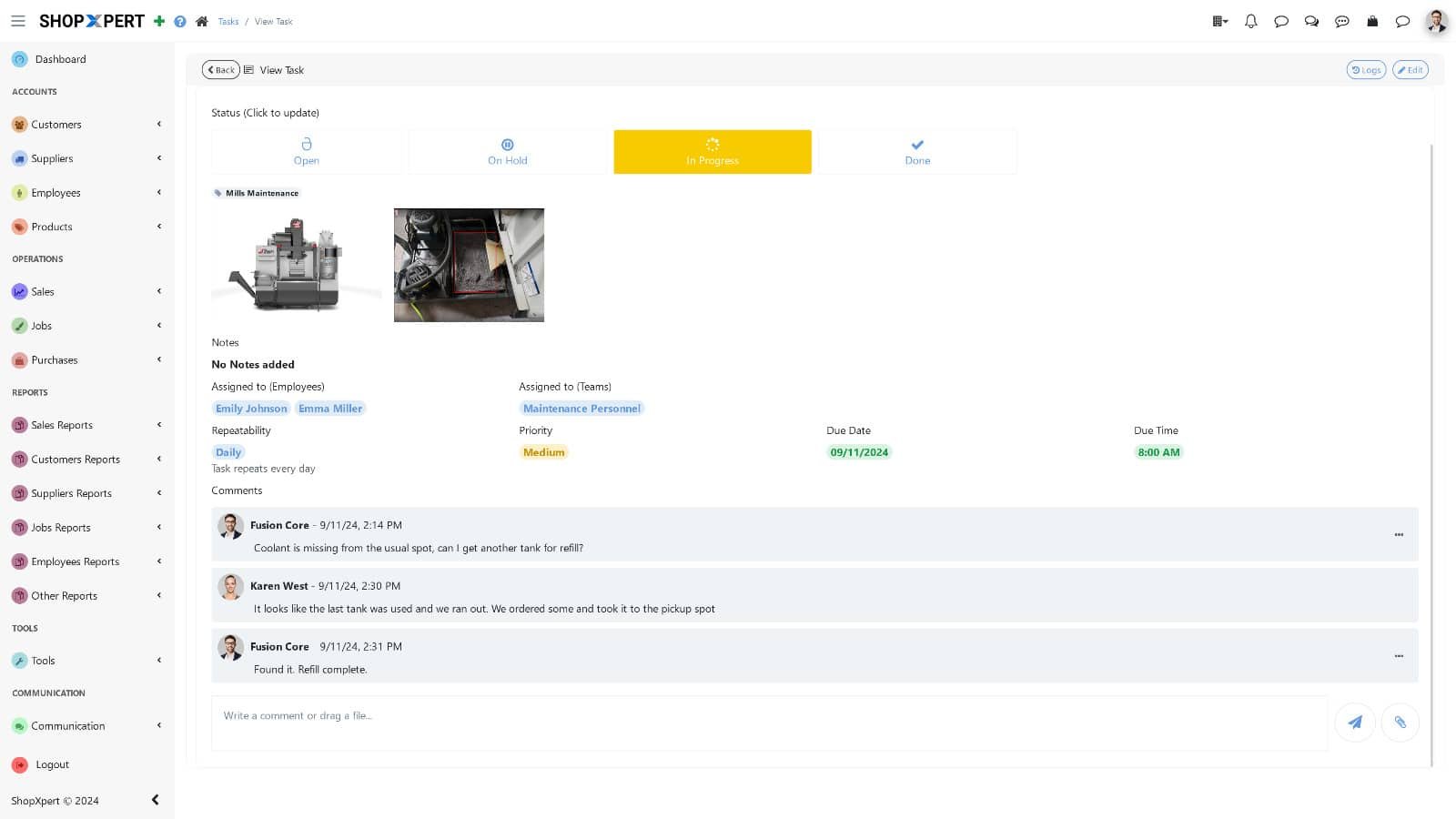
Every task has its own chat. Technicians ask questions, supervisors answer, and photos are added right where the work is recorded, so the next person sees the full story.

The same in-app messenger works on jobs, purchase orders, and supplier RFQs, so maintenance never needs a separate chat app.

  • Real-time chat on specific tasks
  • Photos and files in the thread
  • Traceable comments with names and times
  • Chat on jobs and purchase orders too
Task Chat
ShopXpert task with in-app messenger comments and photo attachments
Customize Forms
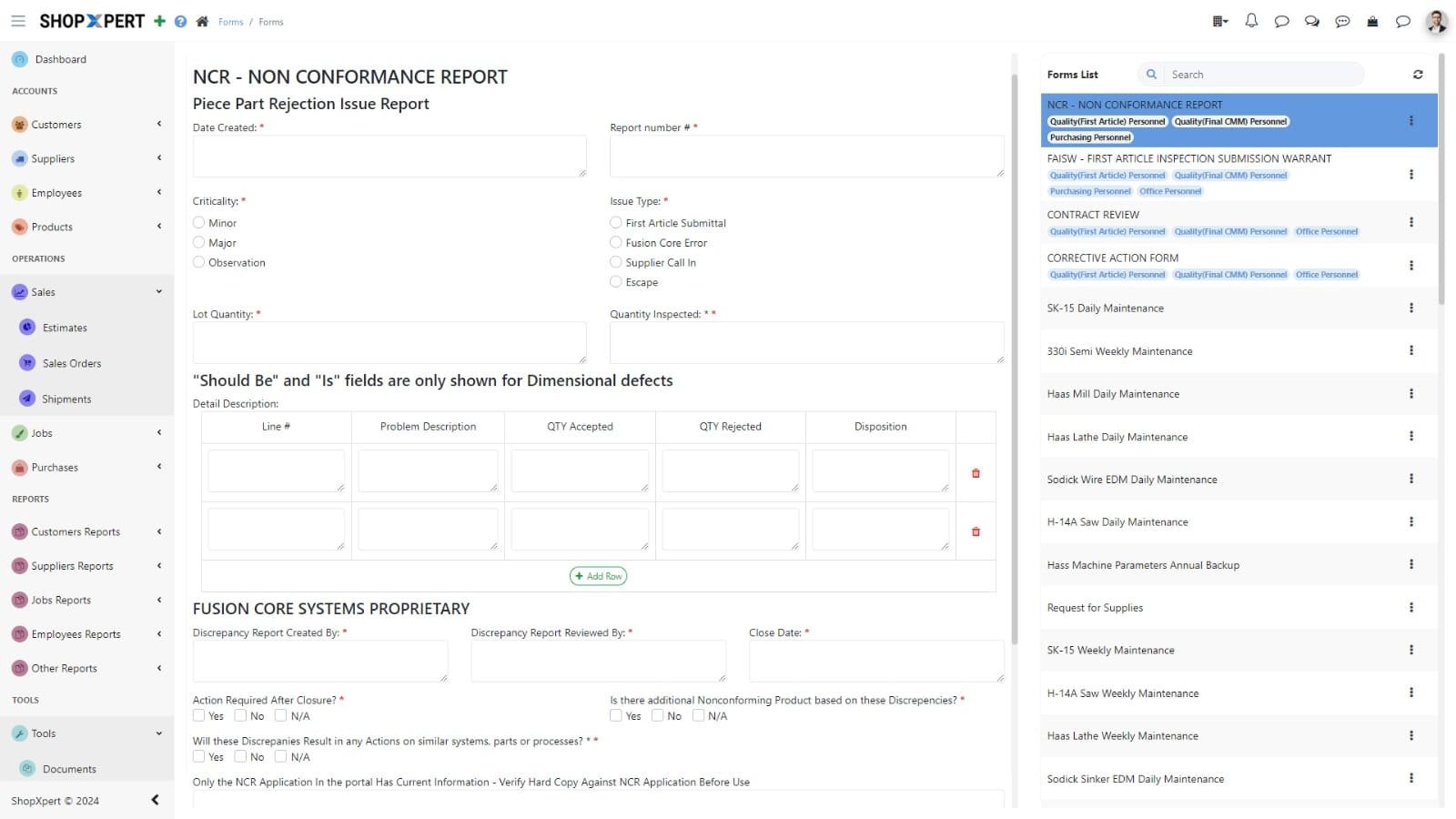
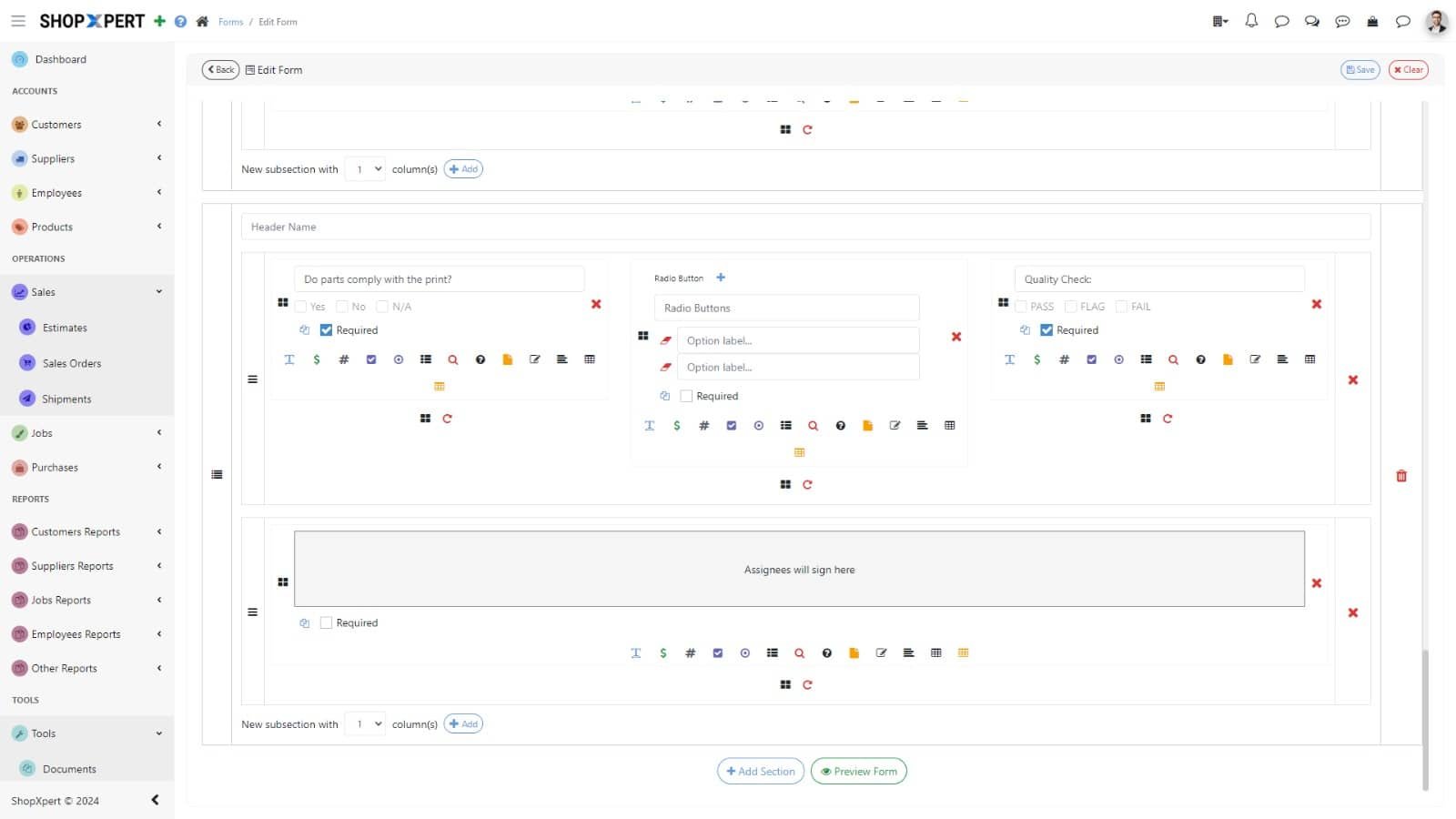
ShopXpert custom form builder customizing a non-conformance report form
Use Cases
ShopXpert custom checklist form for maintenance and inspection use cases
Custom Forms

The problemPaper checklists differ by shift, get skipped under pressure, and cannot prove anything during an audit.

Build Your Own Maintenance Forms, Signatures Included.

Design forms with the drag-and-drop builder and attach them to tasks, jobs, or purchase orders. Build them from sections, use unlimited forms and fields, and preview them as you work.

Use them for daily machine checks, safety checks, service reports, and sign-offs. These are the 12 field types you can use:

Text BoxAmountNumberCheckboxesRadio ButtonsMultiple ChoiceInspection Check (Pass / Fail)Picture / FileSignatureLabel TextStatic TableDynamic Table
How It Works

From Schedule to Signature, Every Time.

Preventive maintenance in ShopXpert runs as one loop that repeats on its own.

01

ScheduleSet a recurring task for a machine, with a template and a due date.

02

AssignThe task goes to the right employee or team, with alerts.

03

DiscussQuestions, answers, and photos stay in the task chat.

04

ProveA custom form with checks and a signature closes the task.

Preventive MaintenanceOctober · All Machines
LIVE
Due today4
Overdue1
Done this month23
MTWTFSS

PM-104 · CNC Mill 3Spindle and coolant check is due today. Assigned to you.

J. RiveraCoolant topped off, filter replaced. Photo attached.

Maintenance form8 of 8 checks passed · Signed

SignedPM-104 closed with form and photo
What Changes

What Preventive Maintenance Gives Back.

Fewer surprises on the floor, and records you can show to anyone who asks.

Less Unplanned Downtime

Problems are caught during scheduled checks, not when a machine stops.

Clear Accountability

Every task has one owner, a due date, and a visible status.

Proof for Every Audit

Signed forms and photos show exactly what was done and when.

Equipment History in One Place

Tasks, chats, forms, and photos stay with the machine.

FAQ

Preventive Maintenance Software Questions.

Want to see your own machines in it? Talk to our team.

What is preventive maintenance software?

Preventive maintenance software schedules routine maintenance before equipment fails, assigns the work, and records what was done. In ShopXpert, it combines recurring tasks, an in-app messenger, and custom forms with signatures.

Is ShopXpert a CMMS?

Yes. ShopXpert includes the core of a computerized maintenance management system: preventive maintenance scheduling, work assignment, maintenance history, and forms, connected to the rest of your shop data.

Can maintenance tasks repeat automatically?

Yes. Tasks can repeat daily, weekly, monthly, or yearly, and each occurrence keeps its own status, chat, and form.

What can we put on a custom form?

Forms support 12 field types: text box, amount, number, checkboxes, radio buttons, multiple choice, pass/fail inspection check, picture or file, signature, label text, static table, and dynamic table.

Can technicians use their phones?

Yes. Tasks are available in the ShopXpert mobile app, and QR codes on machines open the right tasks, forms, and history.

CMMS and Maintenance

Make Preventive Maintenance the Default, Not the Exception.

See recurring tasks, task chat, and signed forms running on your own equipment list.