
Picking an ERP system is the part most shops research. Putting it to work is the part that decides whether it pays off. A machine shop cannot shut down for a month to change systems, so the ERP implementation has to happen while parts are still being cut, quoted, and shipped.
This guide walks through a practical ERP implementation plan for a job shop or contract manufacturer: what to decide first, which data to move, how to set up jobs and the floor, how to train people, and how to go live without losing a week of production. If you are still comparing systems, start with our article on how to choose the best ERP system, then come back here.
Why ERP Implementations Stall in Job Shops
Most stalled implementations do not fail because of the software. They stall for ordinary reasons:
- No clear owner. Everyone is busy running jobs, so the project waits for a slow week that never comes.
- Messy data moved as is. Duplicate customers, old part numbers, and inactive suppliers get imported and confuse people from day one.
- Too much at once. Quoting, scheduling, inventory, quality, and purchasing all switch on the same Monday.
- The floor is an afterthought. The office learns the system, but operators keep filling in paper travelers because nobody showed them the workstation screen.
- Two systems forever. The old spreadsheet stays open “just in case,” and people keep updating both.
A good plan deals with each of these before go-live, not after.
Step 1: Set Goals and Pick an Owner
Write down the three or four problems the new system must fix. Keep them concrete: “we need to know job cost before invoicing,” “operators should stop walking to the office to ask what is next,” or “quotes should come from real costs.” These goals decide which modules go live first and how you will judge success later.
Then name one person who owns the project inside the shop. It does not have to be the owner of the company, but it has to be someone who can make decisions about part numbering, routings, and who gets access to what. Give that person a few protected hours each week.
Step 2: Map How Work Actually Moves
Before you configure anything, trace one typical job from the RFQ to the invoice. Who builds the quote? Who releases the job? Where does material get ordered and received? Which operations go outside for heat treat or plating? Where is the inspection recorded? Who creates the invoice?
Draw it on one page. You will find steps that nobody owns and steps that are done twice. Fix those in the process first, so the new system follows the shop you want, not the workarounds you have.
Step 3: Clean Your Data Before You Move It
ERP data migration is where most of the hidden work lives. Decide what to bring over and what to leave behind:
- Customers and suppliers. Merge duplicates and remove accounts nobody has used in years.
- Parts and products. Agree on one part numbering scheme and current revisions.
- Employees and teams. Group people by the work they do, such as machining, inspection, purchasing, and shipping.
- Open work. Open sales orders, open jobs, and open purchase orders usually need to come across. Closed history can often stay in the old system for reference.
- Serial and job numbers. Note the last number used, so the new system can continue the sequence instead of starting over.
If accounting stays in QuickBooks, decide which system owns each record from now on. Our article on QuickBooks for manufacturing covers how shops split the work between accounting and operations.
Step 4: Build Job Templates and Routings
This is where the system starts to look like your shop. Turn your most common routings into job templates with stages, tasks, assigned teams, and the machines each stage runs on. Start with the jobs you run most often. A handful of good templates covers a large share of daily work, and new templates can be added as unusual jobs come in.
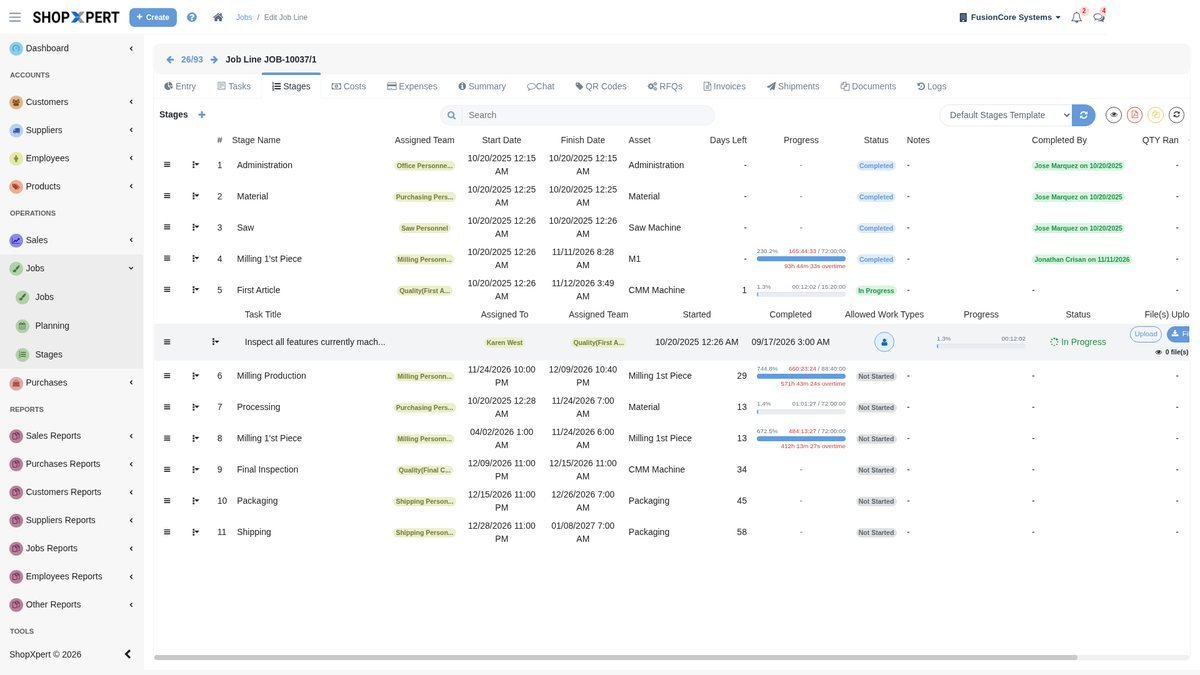
Set up the forms you rely on at the same time: first article, in-process checks, final inspection, and certificates of conformance. Attaching them to the template means every new job starts with the right paperwork already assigned.
Step 5: Phase the Rollout
You do not need every module on day one. A phased ERP implementation plan lets the team learn one area well before adding the next. A common order for a job shop looks like this:
- Jobs and the floor. Job templates, workstation screens, and time on jobs. This is where operators see value first.
- Quoting and job costing. Estimates built from your own costs, so approved quotes become jobs without retyping.
- Purchasing and suppliers. Purchase orders, outside processing, and receiving tied to the job.
- Inventory, quality, and maintenance. Tool and material control, inspection records, and preventive maintenance.
Your goals from Step 1 may change the order. If quoting is the biggest pain, start there.
Step 6: Train by Role, Not by Menu
People learn faster when training matches their daily work. Estimators learn quoting, buyers learn purchase orders, and operators learn how to log in at the workstation, find their job, open the drawing, and record progress. Keep short written procedures for each role so new hires and the next shift learn the same way.
Run a pilot with one cell or one department for a week or two. Let them find the gaps in templates and permissions before the whole shop depends on it.
Step 7: Go Live and Retire the Old System
Pick a go-live date at the start of a week, and avoid month-end close and your busiest shipping days. On that date, new work starts in the new system only. Finish or migrate the remaining open jobs, then make the old spreadsheets read only. As long as both stay editable, people will keep using the old one.
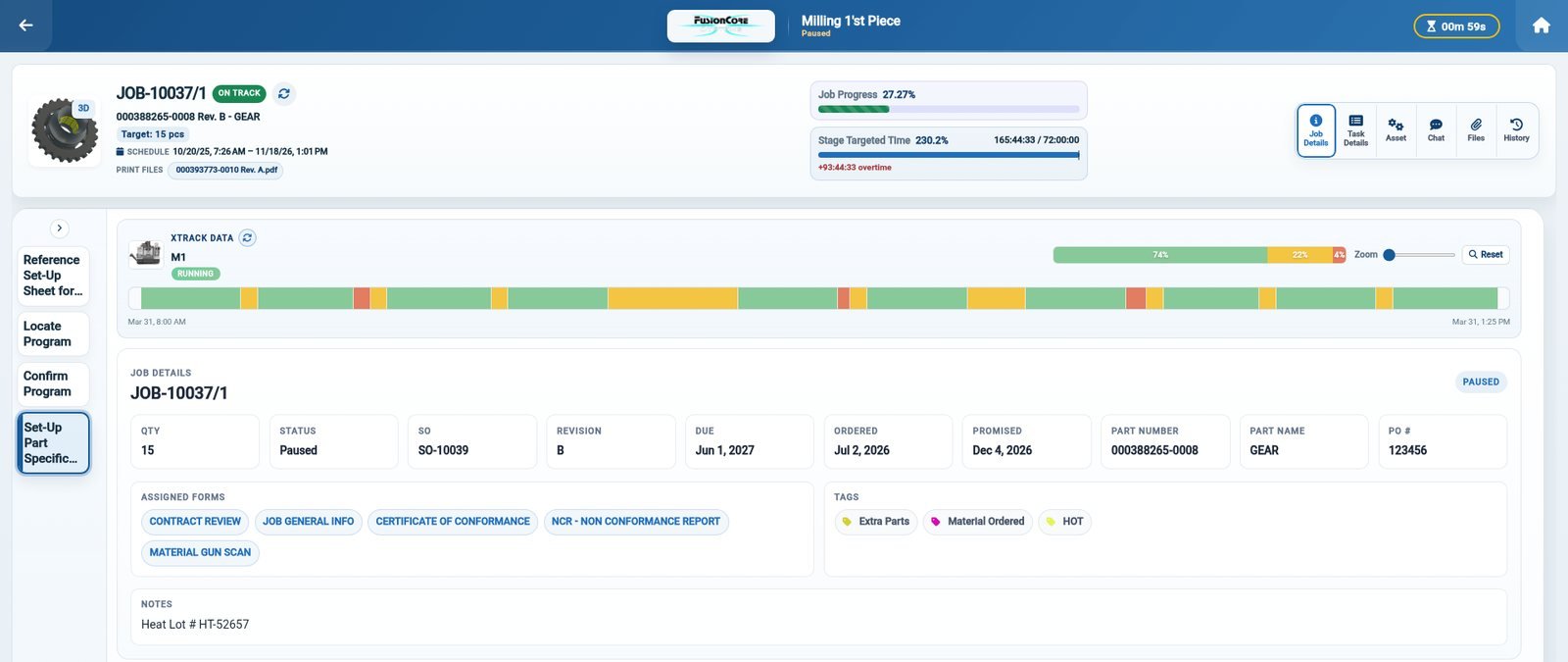
For the first month, the project owner should check a few things every week: are jobs being created from templates, is time being recorded on jobs, are purchase orders received in the system, and do invoices match what shipped. Fix small problems while they are still small.
ERP Go-Live Checklist
- Goals written down and an owner named
- Duplicate customers, suppliers, and parts cleaned up
- Open sales orders, jobs, and purchase orders ready to move
- Last serial and job numbers recorded
- Job templates built for your most common routings
- Forms attached to the right templates
- Users, teams, and permissions set
- Pilot cell trained and running
- Old system set to read only after go-live
How ShopXpert Handles Implementation
ShopXpert has been building manufacturing software for machine shops since 2020, and implementation is part of the service, not something you work out alone. The switch to ShopXpert process follows five steps: discovery of your processes and goals, data preparation, data import with verification, setup and training, and go-live with continued support afterward. ShopXpert can also continue your serial number sequence from the last number used in your current system, so traceability does not reset.
- Modular rollout. The ShopXpert manufacturing ERP lets you start with the areas that hurt most, such as quoting and jobs, and add inventory, quality, or maintenance later.
- Job templates and workstations. Production management starts jobs from templates with stages and tasks already assigned, and operators log in at the workstation with their badge to see stages, tasks, files, and notes.
- Training built in. Training and knowledge management turns procedures into step-by-step courses and tracks who completed what.
- QuickBooks stays. Customers, suppliers, products, and tax codes import from QuickBooks once, then invoices, purchase orders, time entries, and job costs sync from ShopXpert.
Plan Your Move With People Who Have Done It
Bring your current job list, a typical routing, and the spreadsheets you rely on today, and we will show you how ShopXpert would be set up for your shop and what an implementation plan would look like. Book a ShopXpert demo.