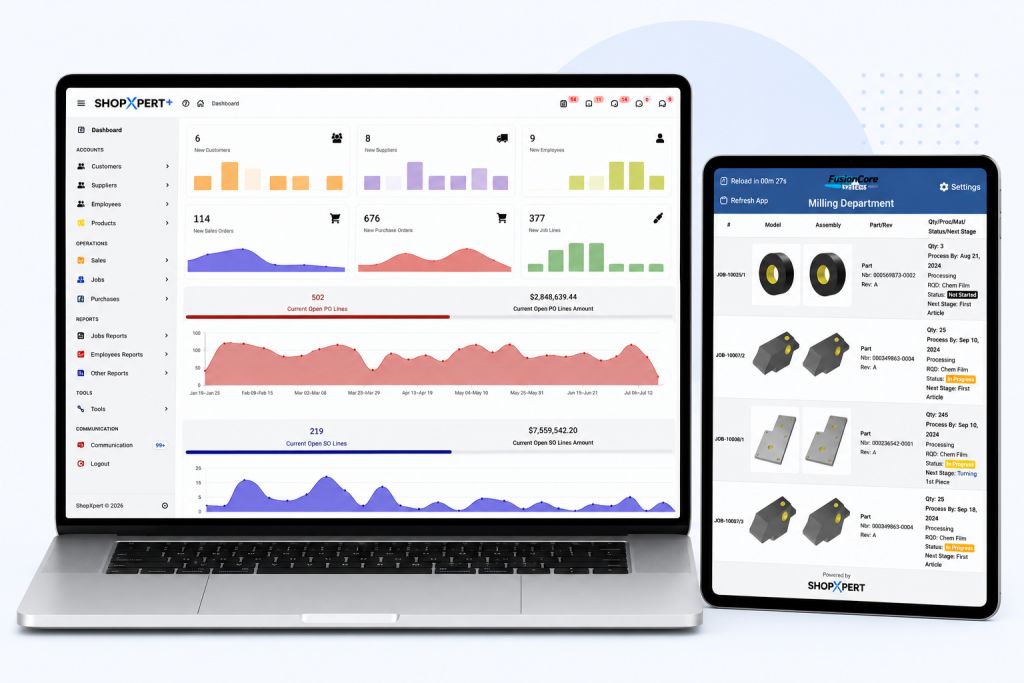
If you run a machine shop, you already know the schedule is rarely the plan you made on Monday. A hot job comes in, a material delivery slips, a setup takes twice as long as estimated, and by mid-morning the whiteboard is wrong. Someone walks to the office to ask what to run next, and the answer depends on who they ask.
That is the problem job shop scheduling software is meant to solve. This guide covers why scheduling is so hard in a job shop, what to look for in machine shop scheduling software, and how to tell whether your shop is ready to move off spreadsheets.
Why Scheduling a Job Shop Is Different
A production line runs the same part through the same steps all day. A job shop does not. Every job can have its own routing, its own machines, its own material, and its own due date. On any given day you might have a 12-piece aerospace housing, a 90-piece flange order, and a rush repair part all competing for the same mill.
That makes job shop scheduling a moving target for a few reasons:
- Routings vary by job. One part goes saw, mill, inspection, ship. The next goes lathe, outside heat treat, grind, inspection.
- Capacity is shared. The same machine and the same operator are needed by several jobs at once.
- Estimates are not actuals. Setup and cycle times drift, and the schedule has to absorb the difference.
- Priorities change. A customer calls, a due date moves, and the order of the whole queue shifts.
A whiteboard or spreadsheet can hold a plan. What it cannot do is update itself when any of those things change.
Signs Your Current Scheduling Method Is Holding You Back
Most shops start with a whiteboard, a spreadsheet, or the scheduling module in an older system nobody likes. That works until it doesn’t. Here are common signs you have outgrown it:
- Operators ask the office what to run next. Every walk to the office is time a spindle is not cutting.
- You find out a job is late when the customer calls. If progress is not recorded on the floor, nobody sees the delay coming.
- Supervisors spend much of the day chasing status. Their time goes to collecting information instead of solving problems.
- The schedule lives in one person’s head. When that person is out, the shop slows down.
- You can’t answer “when can we ship it?” with confidence. Quoting a lead time becomes a guess.
If two or three of these sound familiar, a dedicated scheduling tool will likely pay for itself in recovered hours alone.
What to Look For in Job Shop Scheduling Software
Not every tool labeled “scheduling” fits a machine shop. Here is what matters most when you compare options.
Scheduling based on real capacity
A schedule is only useful if it reflects what your machines and people can actually do. Look for software that sets start and end times from machine and employee availability, not just a list of due dates. If your best five-axis operator is out Thursday, the plan should show it.
A visual planning board
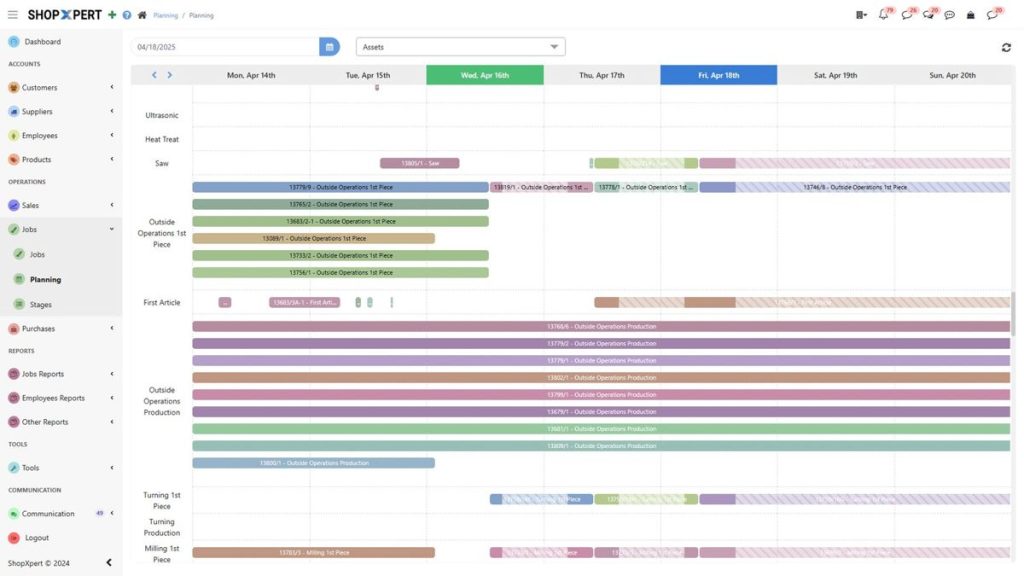
Most shop managers think about the schedule visually, so a Gantt board where you can drag jobs to a new slot is far easier to work with than editing rows in a table. You should be able to see which machines are loaded, which are open, and where jobs overlap.
Dependencies between steps
In a job shop, op 20 can’t start until op 10 is done, and a job can’t ship until inspection signs off. Good scheduling software lets you link dependent steps so that moving one moves the ones after it.
Live progress from the shop floor
This is the part that separates a real scheduling system from a fancy calendar. When operators record start, stop, and quantity at the machine, the schedule can compare planned against actual. That is how you catch a bottleneck while there is still time to do something about it.
Workstation queues for operators
The other half of live data is sending the plan back to the floor. Each workstation should show its own job queue in priority order, along with the current drawing and instructions. When the schedule changes, the queue changes with it, so nobody is working from yesterday’s printout.
Connection to the rest of the business
Scheduling does not live on its own. The same job record should carry the quote, the routing, purchased material, labor time, and cost. If your schedule sits in a separate tool from your ERP, someone ends up retyping data, and the two drift apart.
Questions to Ask Before You Buy
When you sit through demos, these questions help cut through the sales pitch:
- Can I reschedule a job by dragging it, and does everything after it adjust?
- Where does the “actual” data come from? Does the operator have to type it in at the end of the shift, or is it captured as the work happens?
- What does an operator see at the machine? Ask to see the actual screen.
- How does a schedule change reach the floor, and how long does it take?
- Is scheduling part of the same system as quoting, job costing, and purchasing?
- Can you import my existing jobs, parts, and customers, or do we start from scratch?
- What does onboarding look like for a shop my size?
Ask the vendor to walk through one of your real jobs, not a canned example. A messy job with outside processing is the best test.
How to Roll Out Scheduling Software Without Disrupting the Shop
Switching systems is the part that worries most owners, and for good reason. A few practical steps make it easier:
- Start with one department or cell. Get the milling department running on digital queues before adding turning and inspection.
- Get operators involved early. If the workstation screen is confusing, they will go back to asking the office. Let a couple of your experienced operators test it and give feedback.
- Load real routings, not perfect ones. Your setup and cycle estimates will improve once you start capturing actual times. Don’t wait for clean data to begin.
- Retire the whiteboard on purpose. Running two schedules side by side for too long means nobody trusts either one. Pick a date and commit.
- Review planned versus actual every week. This is where the real gains show up: better estimates, better quotes, and fewer late jobs.
How ShopXpert Handles Job Shop Scheduling
ShopXpert has been building shop management software for machine shops since 2020. Its production management software connects jobs, workstations, tasks, and planning so the office and the floor work from the same information.
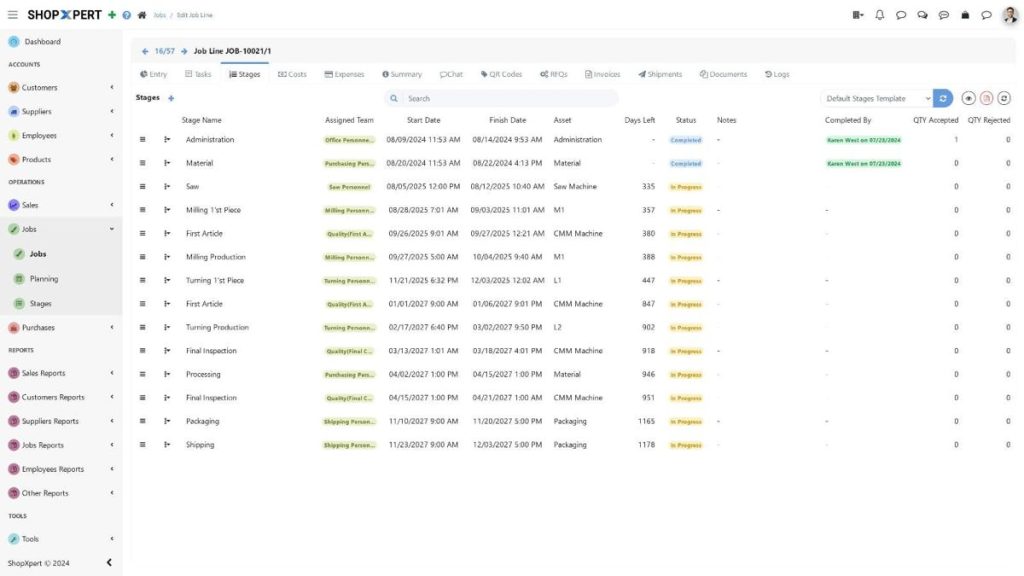
Here is how the pieces line up with the checklist above:
- Drag-and-drop Gantt planning with start and end times set from machine and employee availability.
- Task dependencies so linked steps move together.
- Planned versus actual and a bottleneck view so you see trouble before it stops the floor.
- Workstation screens where operators log in with a badge, see their queue in priority order, open drawings and 3D models, and record time and progress.
- Plan changes reach the workstations right away, so everyone works to the same priorities.
Scheduling is part of the wider ShopXpert platform, which also covers estimating, purchasing, job costing, maintenance, inventory, and quality in one system. If you want to see whether your machines are actually running to plan, XpertTrack machine monitoring uses a magnet-mounted sensor to show running, idle, and downtime status inside ShopXpert, with no controller wiring.
To see what this looks like in a working shop, read how Nytron Aerospace connects its shop floor with ShopXpert. And if you are worried about the move itself, the guide to switching manufacturing ERP walks through the process.
See It With Your Own Jobs
The best way to judge any job shop scheduling software is to watch it handle the kind of work your shop does every day. Book a ShopXpert demo and bring a real job with you, or call us at 810-SHOP-XPT, (810) 746-7978.