
Solutions / Quoting and Job Costing

Job Costing Software That Prices Work From Real Numbers, Not Gut Feel.

Quotes built from memory win the wrong jobs and lose the right ones. ShopXpert job costing software builds every estimate from costing templates and formulas you define, turns approved quotes into jobs, and shows estimate vs actual so the next quote is sharper.

Costing templates with your formulasRepeat estimates in secondsEstimate vs actual on every job
Estimate EST-10060 · Rev BBracket · Qty 40 · Machining Cost
LIVE
Cost each$330
Lead time3 wks
Markup28%
Material$3,920
Processing$5,640
Heat treating$1,480
Certs & marking$720
Template itemCalculated cost
Total price$18,400
JOB 1842Created from the approved estimate
Sound Familiar?

Why Quotes Miss Without Job Costing Software.

Pricing is a guess until real costs flow back into the next estimate.

Every estimator prices the same part differently.
With ShopXpertShared costing templates apply the same formulas and rates to every quote.
Quoting a repeat part means digging through old emails.
With ShopXpertRepeat Estimates finds past quotes by part number, with price, lead time, and job.
Heat treat, plating, and certs get forgotten on the quote.
With ShopXpertTemplate items cover outside processing, marking, certs, and inspection, each with cost and lead time.
We never learn whether the quote was right.
With ShopXpertEstimate vs actual on every job feeds the next quote.
Costing Tools

The problemThe real pricing logic lives in one person’s spreadsheet, and nobody else can use it.

Build Your Pricing Logic Once, Use It on Every Quote.

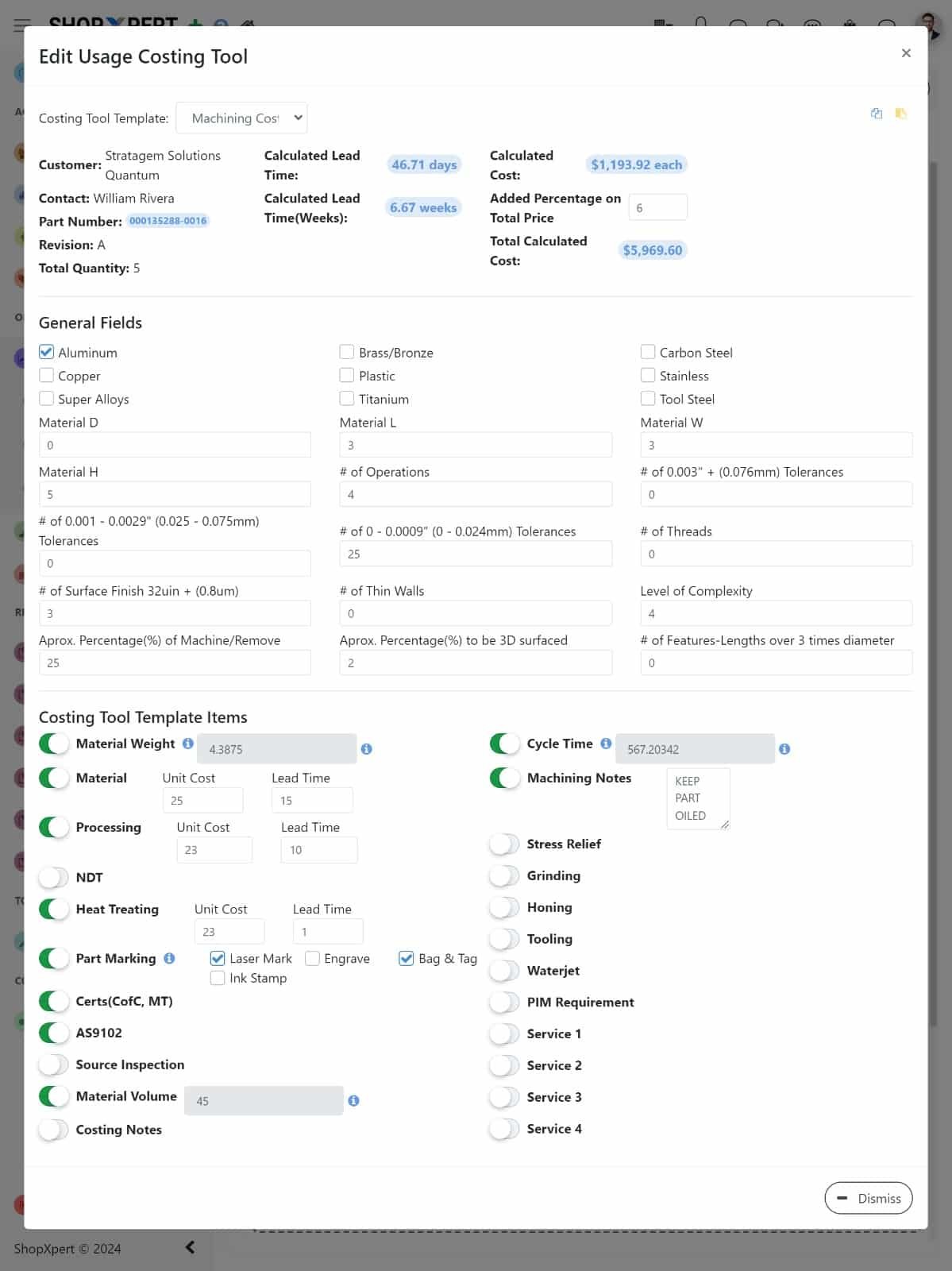
Create costing templates for the work you do, such as machining, fabrication, or assembly. Each template holds the fields an estimator fills in: material type and size, number of operations, tolerances, threads, surface finish, thin walls, and complexity.

Template items add the rest: material, processing, heat treating, NDT, part marking, certs, AS9102 first article, source inspection, grinding, and more. ShopXpert calculates the cost each, the total cost, and the lead time, and you add the markup.

  • Templates for each type of work
  • Material, tolerance, and complexity fields
  • Outside processing and certs as cost items
  • Calculated cost, lead time, and markup
Costing Tool
Job costing software screen in ShopXpert: Edit Usage Costing Tool with material, tolerance, and process fields
Formula Builder
ShopXpert costing formula builder with conditions, cost formulas, and lead time formulas
Formula Builder

The problemGeneric quoting tools force your shop into their pricing model.

Your Formulas, Your Conditions, Your Lead Times.

Every template item can have its own cost formula and lead time formula, with conditions. Charge one rate when the material is titanium and another when it is aluminum, or add a day of lead time when parts need stress relief.

Use fixed amounts, outputs, and notes, so the estimate shows exactly how a price was built.

  • Conditional cost formulas
  • Lead time formulas per item
  • Fixed amounts, outputs, and notes
  • Custom fields for your industry
Repeat Work

The problemA customer reorders a part from last year, and the old quote is impossible to find.

Requote Repeat Parts in Seconds.

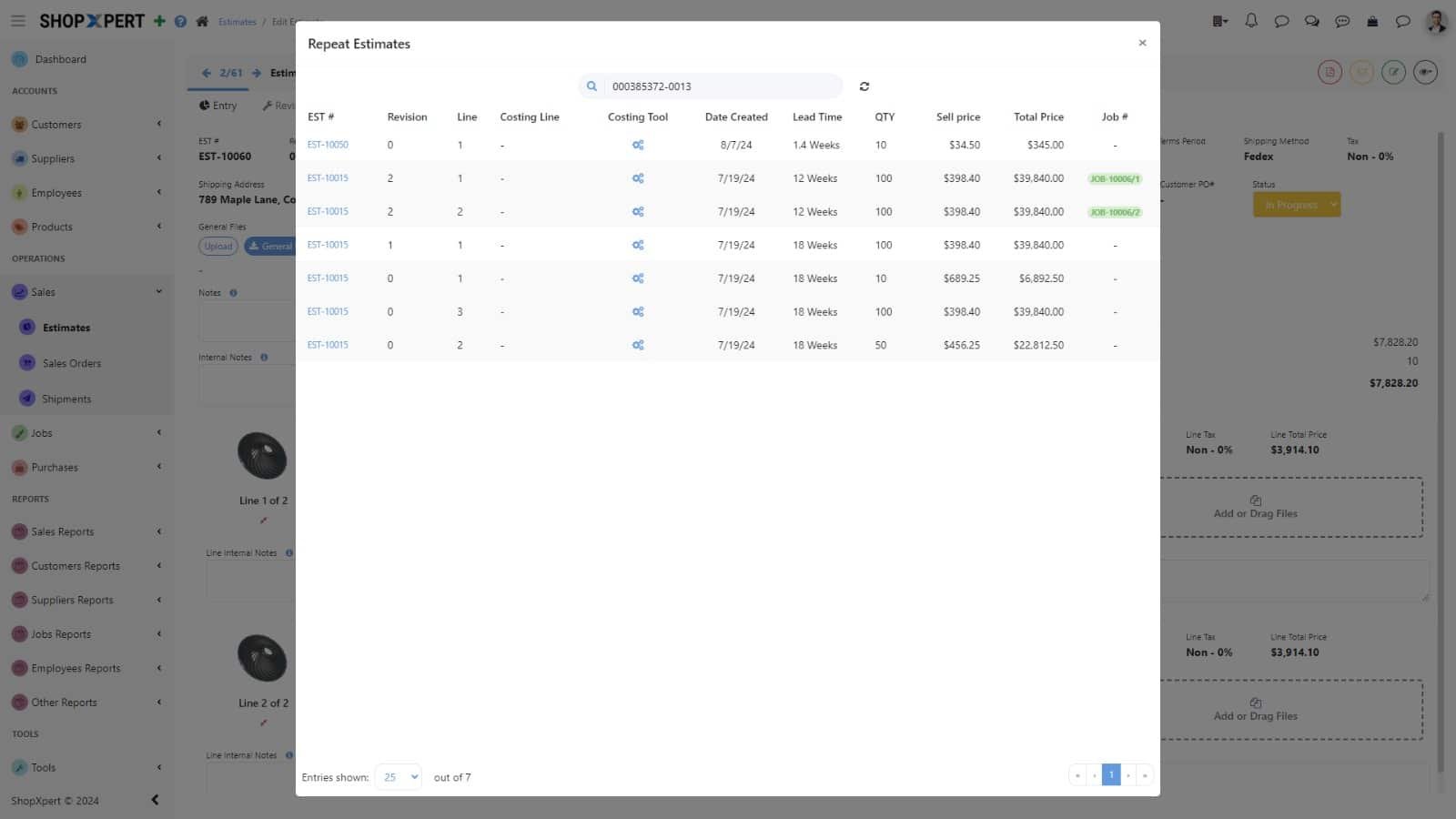
Search Repeat Estimates by part number to see every past estimate with its revision, costing tool, lead time, quantity, sell price, and the job it became.

Estimates keep revisions, customer PO, shipping, terms, internal notes, and files, so nothing about the last order is lost.

  • Search past estimates by part number
  • Revision history on every estimate
  • Linked jobs for each past quote
  • Internal notes and files on the estimate
Repeat Estimates
ShopXpert Repeat Estimates search showing past quotes with price, lead time, and linked job
Jobs
ShopXpert jobs list with due today, due this week, and overdue metrics
Quote to Job

The problemWinning the job means retyping the whole quote into the system that runs production.

Approved Quotes Become Jobs Without Retyping.

When the work is approved, the estimate becomes a sales order and a job with stages, tasks, deadlines, and purchasing needs. The costing tool stays linked from estimate to sales order.

Labor, material, and outside costs post to the job as work happens, so you compare the estimate with actual cost while the job is running. See the full flow in manufacturing ERP.

  • Estimate to sales order to job
  • Costing tool linked to the sales order
  • Real-time estimate vs actual
  • Historical cost data for future quotes
How It Works

From Cost Stack to Approved Job.

Every quote is built from the same logic and checked against what jobs really cost.

01

Fill the TemplateEnter material, size, operations, and requirements.

02

CalculateFormulas build cost each, total cost, and lead time.

03

QuoteAdd markup, keep revisions, and send the estimate.

04

Convert and CompareApproved work becomes a job, and actual cost is tracked against it.

COSTING TOOLBracket · Qty 40MATERIAL$3,920LABOR$5,640OUTSIDE$1,480OVERHEAD$2,160MARGIN$5,200QUOTE Q-2318Acme AerospaceTOTAL$18,400APPROVEDSALES ORDERSO-5521Created from Q-2318JOBJOB 1842Routed, no retypingESTIMATE VS ACTUAL · LAST 5 SIMILAR JOBSPrice it right the first timeReal costs build the quote, and the quote becomes the job.
What Changes

What Job Costing Software Changes.

Faster quotes, consistent prices, and margins you can check.

Consistent Pricing

Every estimator uses the same templates and formulas.

Faster Quotes

Templates and repeat estimates cut quoting time.

Margins You Can Check

Estimate vs actual on every job.

Nothing Forgotten

Outside processing, certs, and inspection are part of the template.

FAQ

Job Costing Software Questions.

Want to see your own pricing logic in ShopXpert? Talk to our team.

What is job costing software?

Job costing software estimates and tracks the cost of each job, including material, labor, outside processing, and overhead, so you can price work accurately and compare estimates with actual cost. See the accounting definition of job costing.

Can we use our own pricing formulas?

Yes. Costing templates support custom fields and items, each with conditional cost and lead time formulas.

How do we requote a repeat part?

Search Repeat Estimates by part number to see past estimates with revision, price, lead time, and the job each one became.

Does the quote become a job automatically?

Approved estimates convert into sales orders and jobs with stages, tasks, and deadlines, and the costing tool stays linked to the sales order.

Can we compare estimated and actual costs?

Yes. Labor, material, and outside costs post to the job as work happens, and ShopXpert compares them with the estimate in real time.

Quoting and Job Costing

Quote Faster, and Know the Price Was Right.

See your own costing templates and formulas running in ShopXpert.