
Solutions / Supplier and Outsource Management

Supplier Management Software That Keeps Outside Work From Falling Through the Cracks.

Heat treat, plating, and machining sent outside are where jobs go quiet. ShopXpert supplier management software sends RFQs to many suppliers, compares bids, turns the winner into a purchase order, and gives suppliers a portal to bid, update status, and share documents, all tied to your jobs.

RFQs to many suppliers at onceSupplier portal includedOn-time and quality scores
RFQ-2207 · Heat TreatJOB 1842 · Op 40 · Qty 40
3 BIDS
AE

Aero Engineering Inc.$1,480 · ships in 5 days · 98% on time

Best value
HA

Howard Aeronautics$1,390 · ships in 9 days · 91% on time

Bid
DA

Distributed AerospaceNo bid · capacity full this week

No bid

Supplier score 88 / 100Quality and on-time delivery from past orders

PO-10056Created from the winning bid
Sound Familiar?

Problems Supplier Management Software Should Fix.

Outside work is often the least visible part of a job, and the most likely to make it late.

RFQs go out by email, and half the answers never come back.
With ShopXpertSend RFQs to one or many suppliers and see every bid and no-bid in one list.
We have no idea where the parts are until they are late.
With ShopXpertTrack expected and actual delivery, and let suppliers update order status in their portal.
A supplier’s certification expired and nobody noticed.
With ShopXpertCertificates are stored with expiry dates, with alerts and email notifications.
Picking a supplier is based on who answered the phone.
With ShopXpertScorecards show on-time delivery, quality, and bid history for every supplier.
RFQs and Bids

The problemComparing quotes means three email threads and a spreadsheet.

Send One RFQ, Compare Every Bid Side by Side.

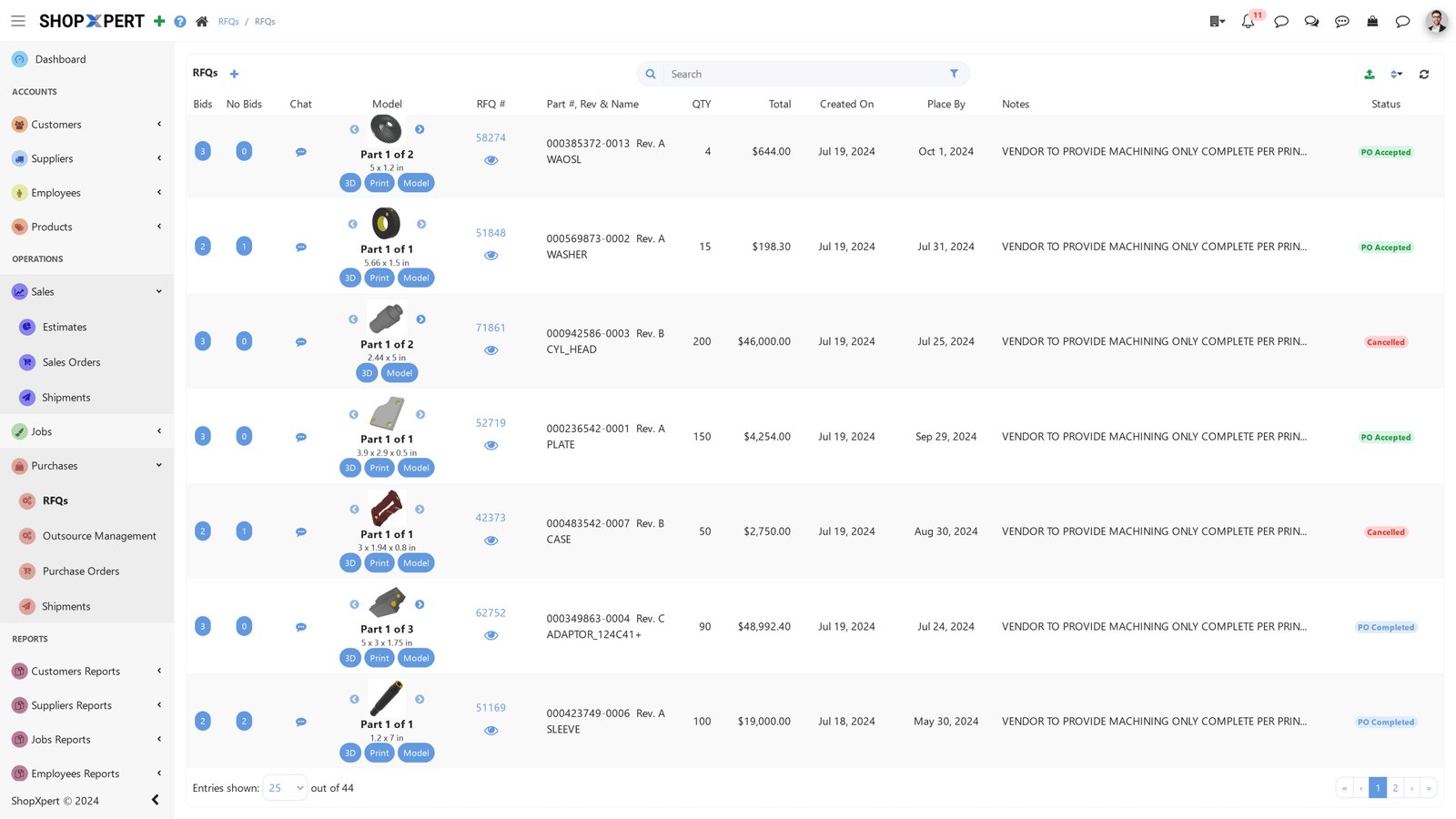
Create an RFQ from the job, attach drawings, and send it to one or many suppliers. Bids, no-bids, prices, and ship dates come back into one list, with internal notes and chat on each line.

Pick the best bid and create the purchase order directly from it. Quote history stays with each supplier for the next time.

  • RFQs to one or many suppliers
  • Bid and no-bid tracking
  • Purchase orders created from RFQs
  • Quote history per supplier
RFQs
Supplier management software RFQ list in ShopXpert with part images, suppliers, and bid statuses
Outsource Dashboard
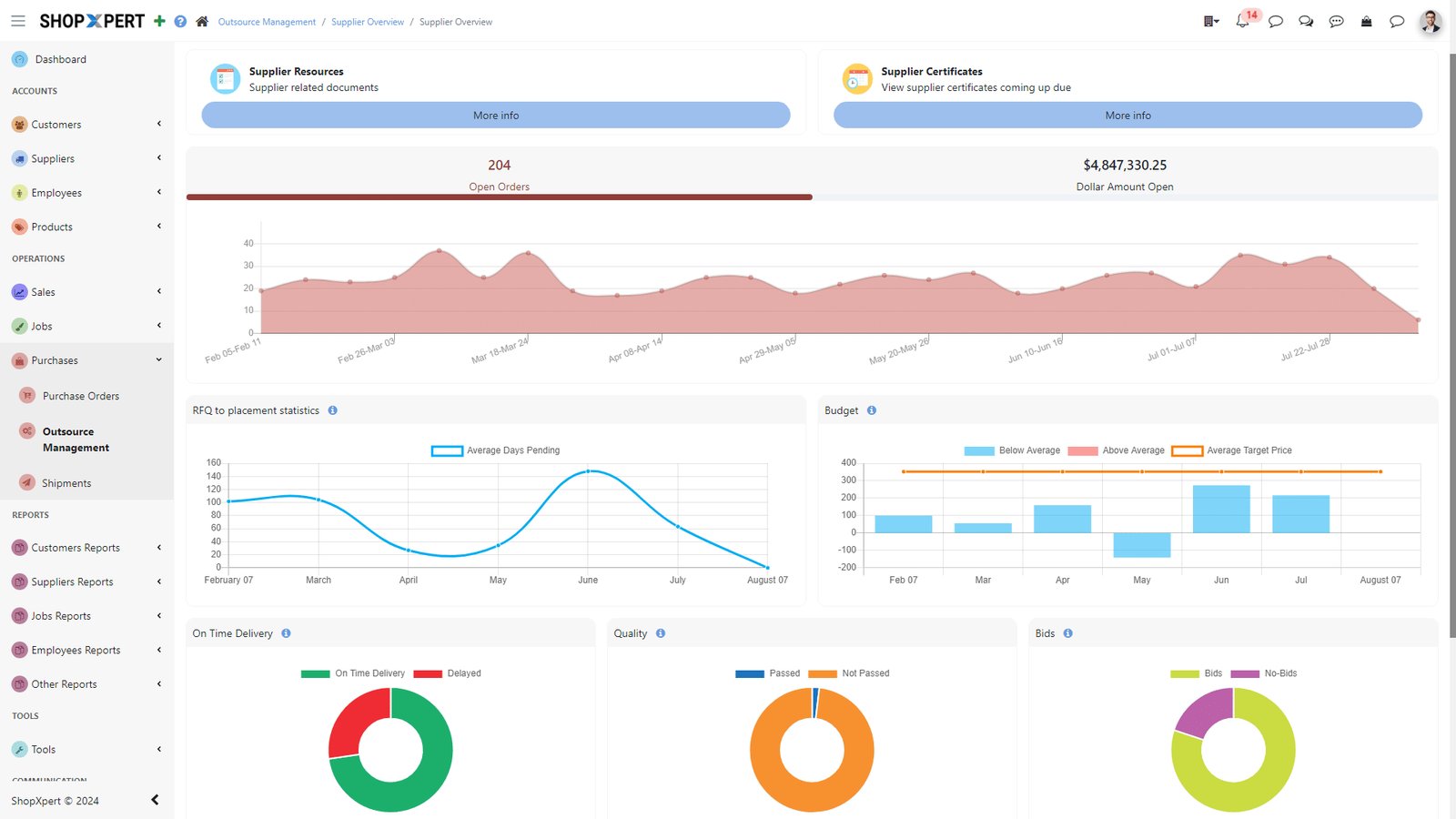
ShopXpert outsource management dashboard with open orders, budget, and supplier performance charts
Outsource Dashboard

The problemNobody can say how much outside work is open, or which suppliers are slipping.

See Open Orders, Budget, and Risky Suppliers at a Glance.

The outsource dashboard shows open orders and the dollar amount open, RFQ-to-placement time, budget, on-time delivery, quality rating, and bids vs no-bids.

Filter risky suppliers by dollar amount, quality, and delivery, so you can act before a late supplier makes a job late. Outsourced work stays tied to its job and operation.

  • Open orders and dollars open
  • On-time delivery and quality ratings
  • Risky supplier filters
  • Outsourced work tied to jobs
Supplier Portal

The problemSuppliers call to ask for drawings, and you call them to ask for status.

Give Suppliers a Portal Instead of a Phone Number.

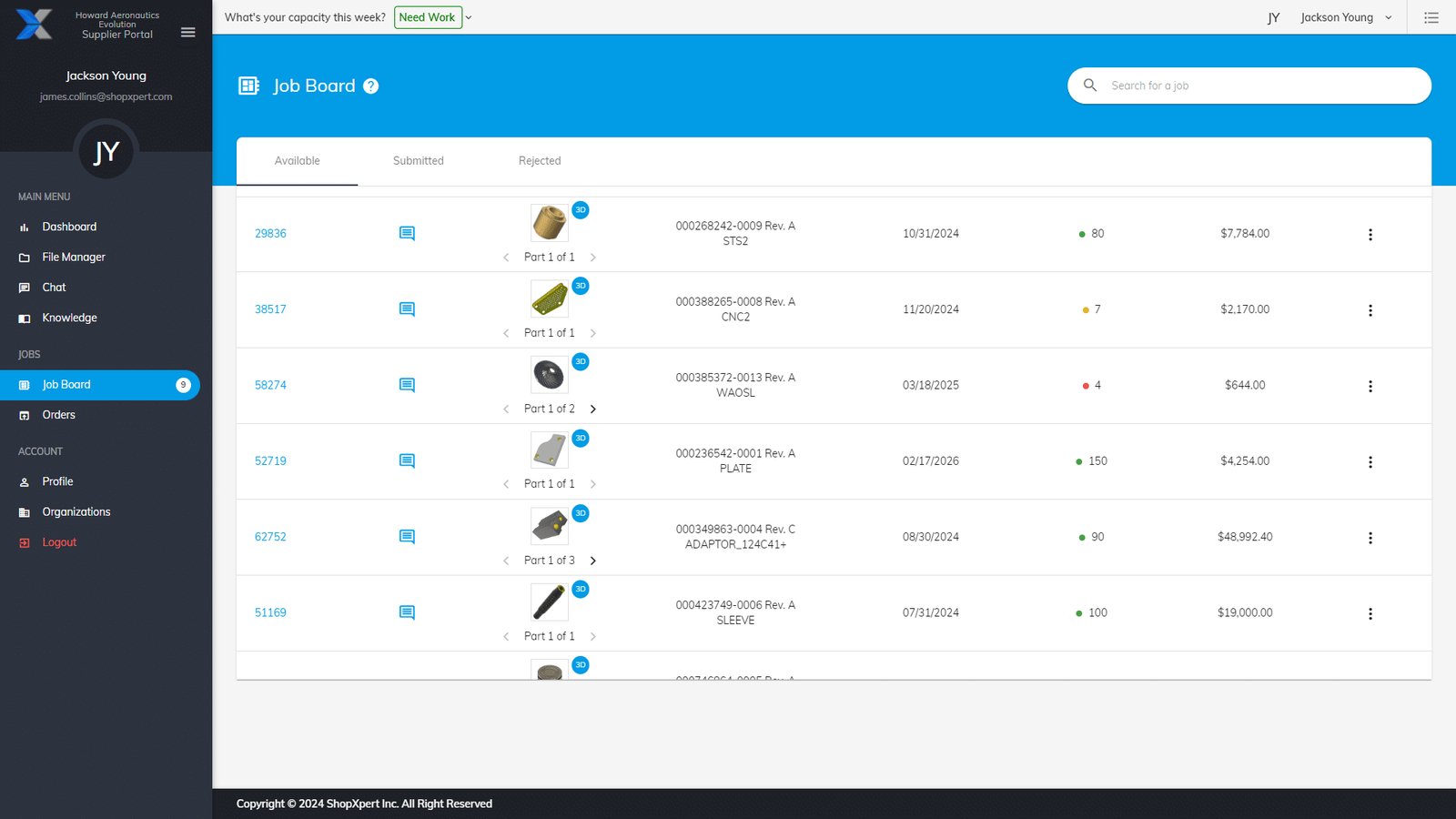
Suppliers get their own portal with a job board of available RFQs to bid or no-bid. On awarded orders, they update status, upload packing slips, attach invoices, and fill in your supplier forms.

They keep their profile current, including machinery, materials, finishes, certifications with expiry dates, and weekly capacity. Their dashboard shows jobs awarded, quality, delivery, and a success score.

  • Job board to bid or no-bid
  • Order status, packing slips, and invoices
  • Certifications and capacity in the profile
  • Secure file manager and knowledge library
Supplier Portal
ShopXpert supplier portal job board with RFQs, prices, and ship-by dates
Certificates
ShopXpert supplier certificates list with expiry dates
Supplier Chat
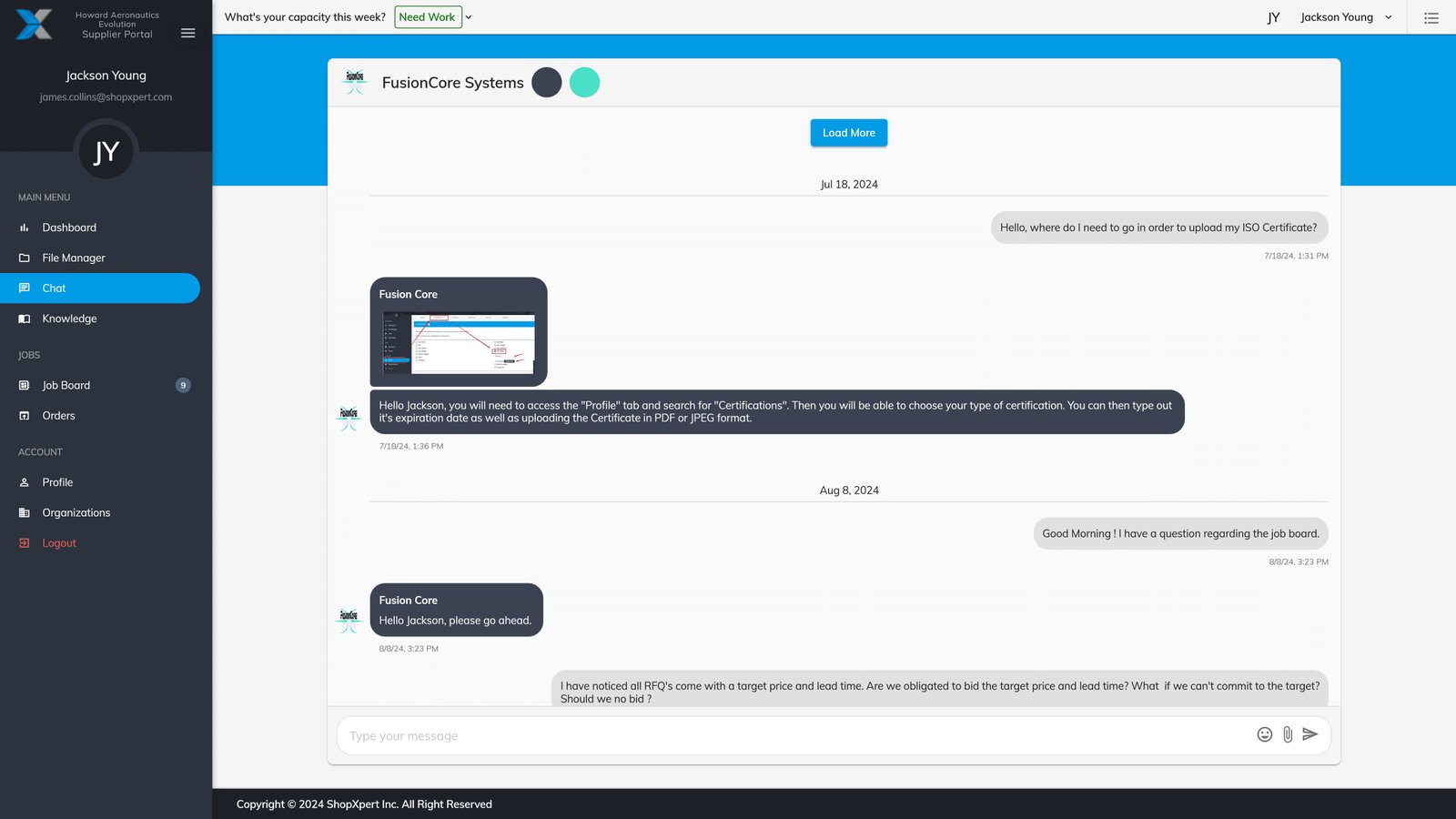
ShopXpert supplier chat thread about a purchase order
Certificates and Communication

The problemSupplier certs expire quietly, and conversations about orders are scattered across inboxes.

Certificates That Warn You, and Chat That Stays on the Order.

Keep supplier certificates in one list with expiry dates. ShopXpert sends alerts and email notifications before they expire, and you can notify the supplier from the app.

Chat with suppliers per purchase order, per RFQ, or in a general supplier thread, so every answer stays with the order it belongs to. Supplier audits, SCARs, and deviation requests are tracked in the same place.

  • Certificate expiry alerts
  • Chat per PO and per RFQ
  • Supplier audits with custom forms
  • SCAR and deviation request tracking
How It Works

From RFQ to Received, Without Chasing.

Each step is recorded, and suppliers update their own part of it.

01

Send the RFQRequest bids from one or many suppliers.

02

Compare BidsSee prices, ship dates, and supplier scores side by side.

03

Place the POCreate the purchase order from the winning bid.

04

Track and ReceiveSuppliers update status, and on-time delivery is recorded.

YOUR SHOPJOB 1842 · Op 40SUPPLIERHeat treat and finishingPO-10056 · SHIPPEDRECEIVED · 40 / 40RFQ TO DELIVERY · UPDATED BY THE SUPPLIERRFQ sentBids comparedPO placedIn processPacking slipReceivedKnow where every outside job isSuppliers update status in their own portal.
What Changes

What Supplier Management Software Changes.

Outside work becomes as visible as work on your own floor.

Fewer Late Jobs

Outside work is tracked against expected dates.

Faster Sourcing

One RFQ, many bids, and a PO in one click.

Compliant Suppliers

Certificates with expiry alerts and audit records.

Better Supplier Choices

Scores built from real delivery and quality.

FAQ

Supplier Management Software Questions.

Want to see the supplier portal? Talk to our team.

What is supplier management software?

Supplier management software organizes how you source, buy from, and evaluate suppliers. ShopXpert covers RFQs, bids, purchase orders, certificates, scorecards, and a supplier portal. See also supplier relationship management.

Can we send one RFQ to several suppliers?

Yes. Send an RFQ to one or many suppliers, compare bids side by side, and create the purchase order from the winning bid.

What can suppliers do in the supplier portal?

Suppliers bid or no-bid on RFQs, update order status, upload packing slips and invoices, fill in your forms, manage their certifications and capacity, and chat about orders.

How are supplier certificates tracked?

Certificates are stored with expiry dates, and ShopXpert sends alerts and email notifications before they expire.

Is outsourced work tied to jobs?

Yes. Outsourced work can be linked to jobs and operations, so you have traceability from RFQ to delivery.

Supplier and Outsource Management

Make Outside Work as Visible as Your Own Floor.

See RFQs, bids, purchase orders, and the supplier portal working together.