
Solutions / Workforce and Time Tracking

Employee Time Tracking That Captures Hours and Job Time Without Timesheets.

Paper timesheets are filled in at the end of the week from memory, and job labor is a guess. ShopXpert employee time tracking records clock-ins with an RFID badge, handles breaks, shifts, and leave, and captures time on jobs at the workstation, in the same system that runs your shop.

RFID badge clock-inShifts, breaks, and leaveJob time at the workstation
Time Clock · LiveDay Shift · Production
LIVE
Clocked in18
On break2
Late today1
B. Stone
6h 12m
M. Chen
6h 01m
J. Rivera
3h 40m
A. Patel
5h 48m
Clocked inK. West · RFID badge · 6:58 AM
Sound Familiar?

Why Shops Replace Timesheets With Employee Time Tracking.

Labor is usually the biggest cost on a job, and the least accurately recorded.

Timesheets are written on Friday from memory.
With ShopXpertEmployees clock in and out with an RFID badge, and hours are recorded as they happen.
Payroll means retyping hours and working out overtime by hand.
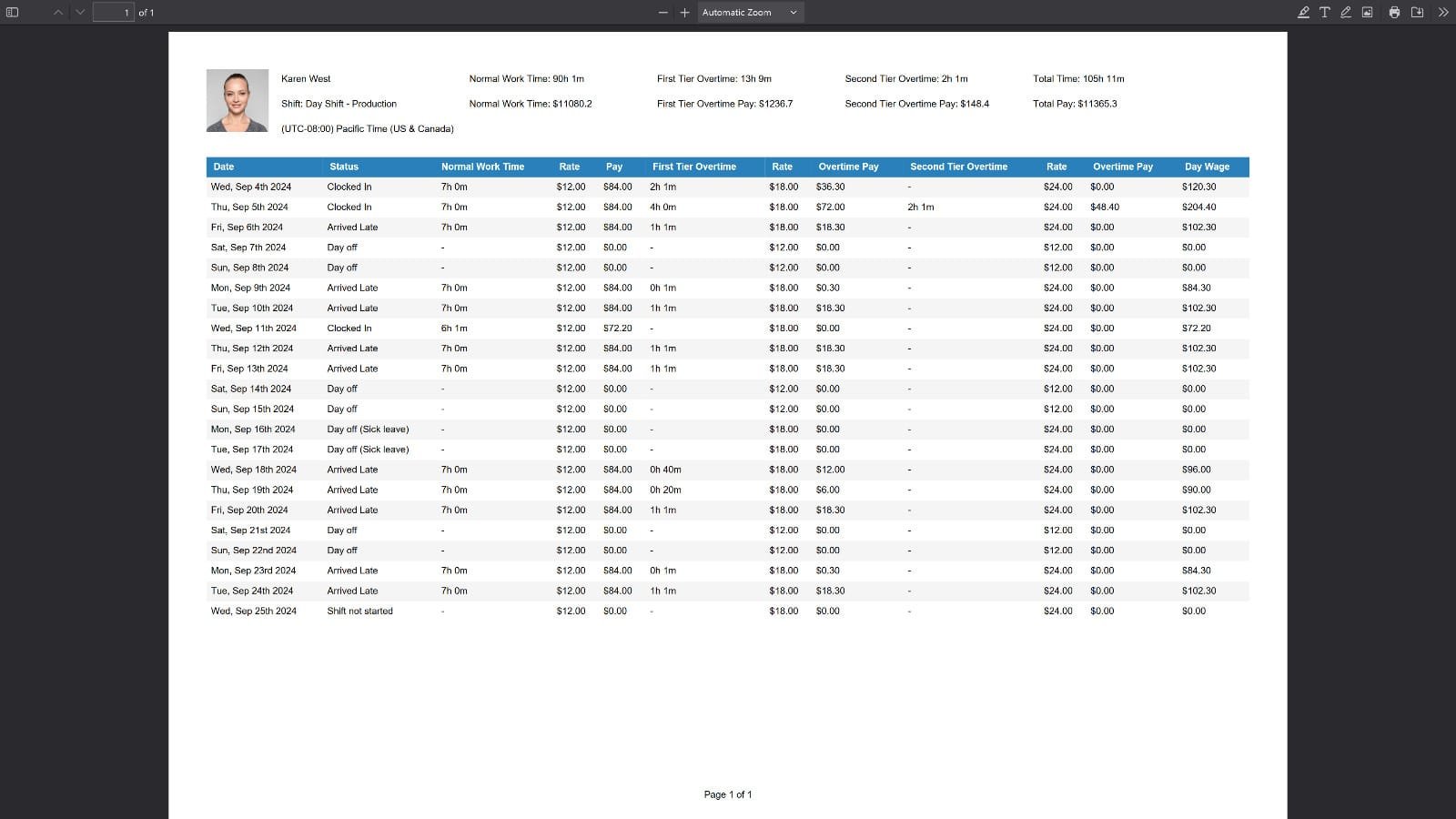
With ShopXpertTime reports show normal time, two tiers of overtime, rates, and pay, exportable as PDF.
Leave requests arrive by text and get lost.
With ShopXpertEmployees request leave in their portal, and managers approve or reject it with full history.
We know who was at work, not what they worked on.
With ShopXpertOperators log time against jobs and operations at the workstation.
Time Clock

The problemBuddy punching, missed punches, and handwritten corrections make attendance unreliable.

Clock In With a Badge, See Who Is Here in Real Time.

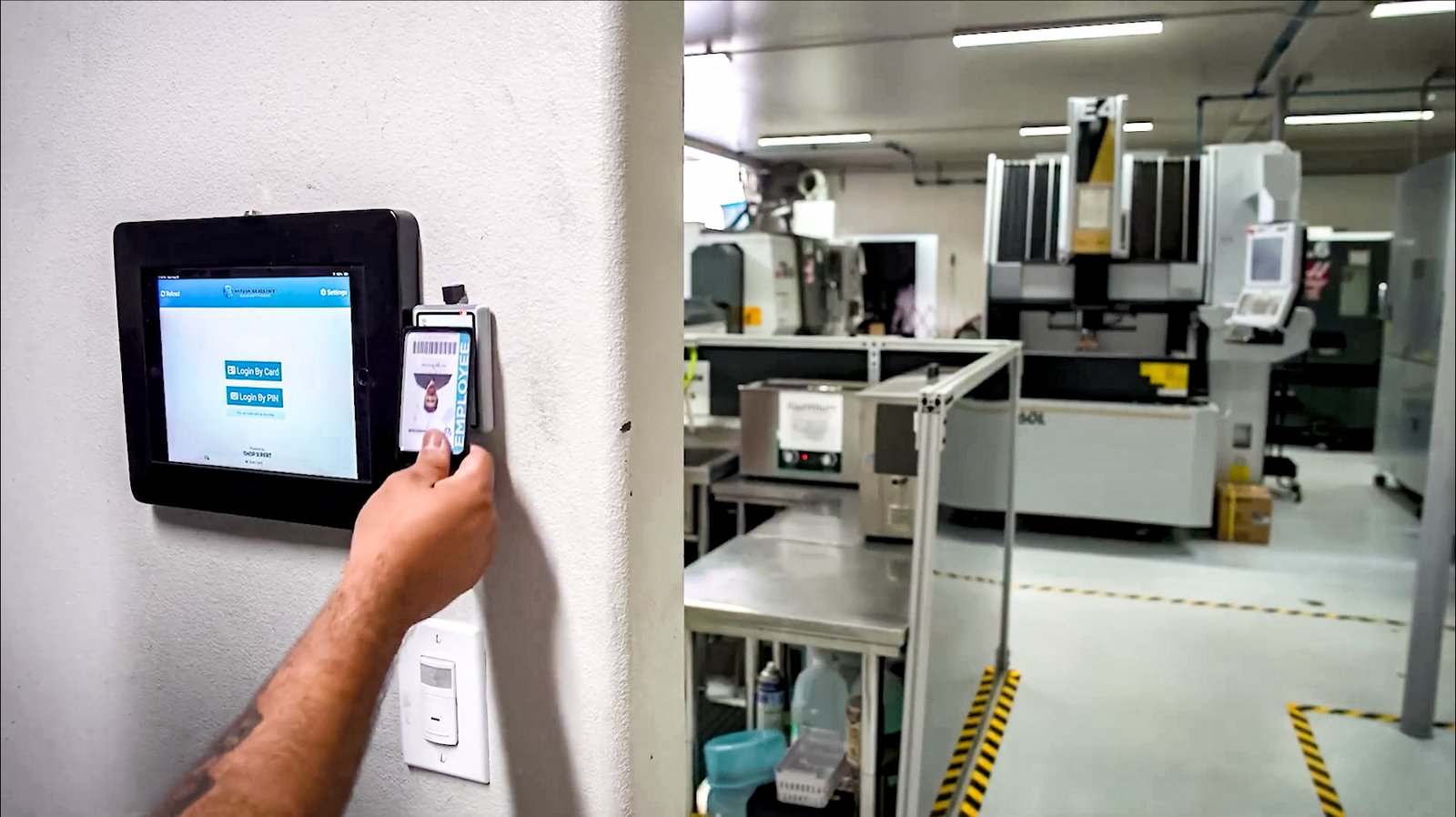
Mount a time clock tablet by the door, and employees clock in, start a break, and clock out with their RFID badge. The PoE tablet runs on a single cable for power and data.

Managers see who is clocked in, on break, late, or on a day off, live, and can verify attendance at specific work locations. For guests, the Receptionist Portal adds a visitor sign-in kiosk at the same entrance.

  • RFID badge clock-in and clock-out
  • Lunch and break tracking
  • Live view of who is clocked in
  • Time clock tablet and badge reader hardware
Employee time tracking with an RFID badge scan at a ShopXpert time clock tablet on the shop floor
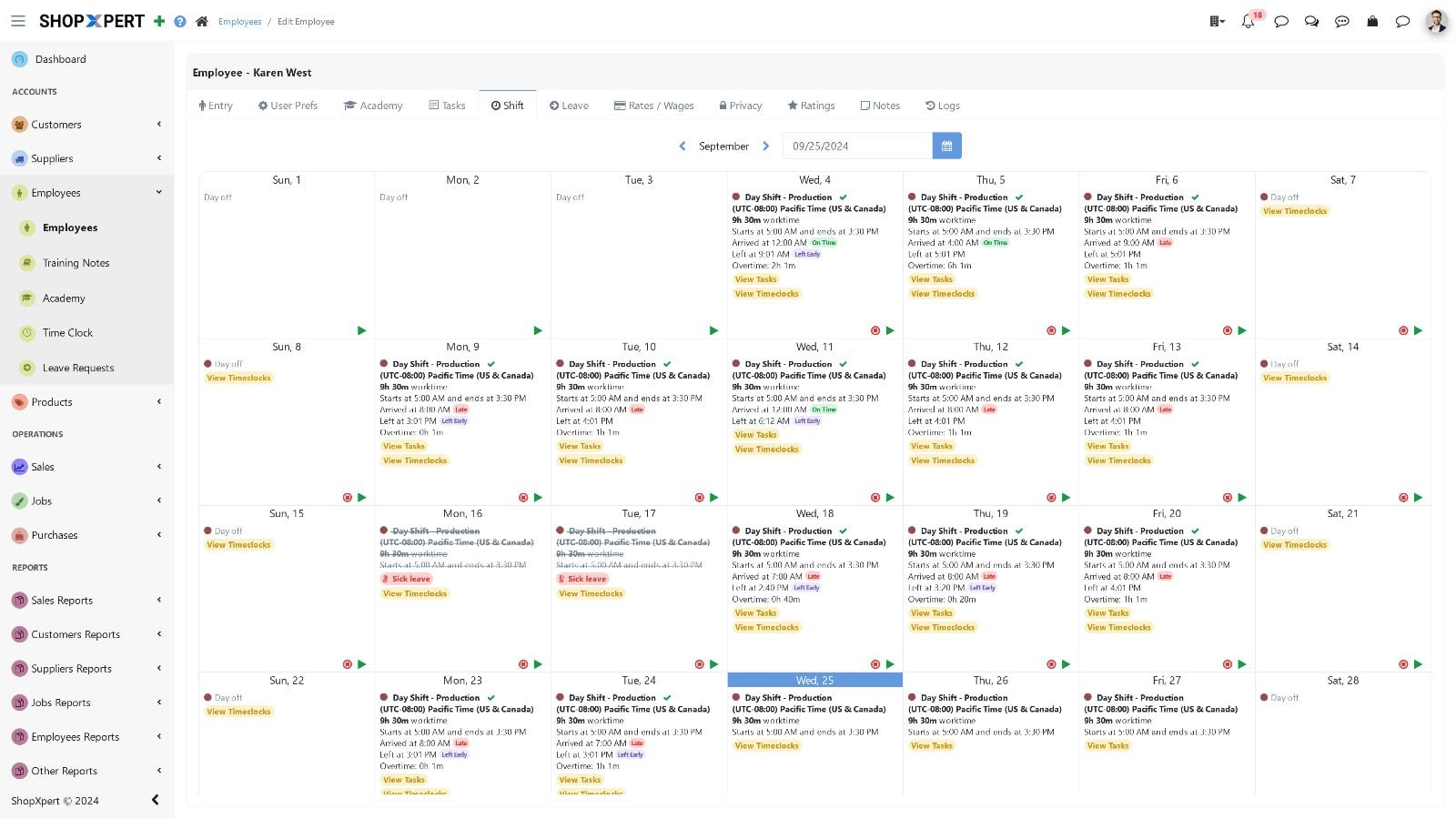
Shift Calendar
ShopXpert shift scheduling calendar for production employees
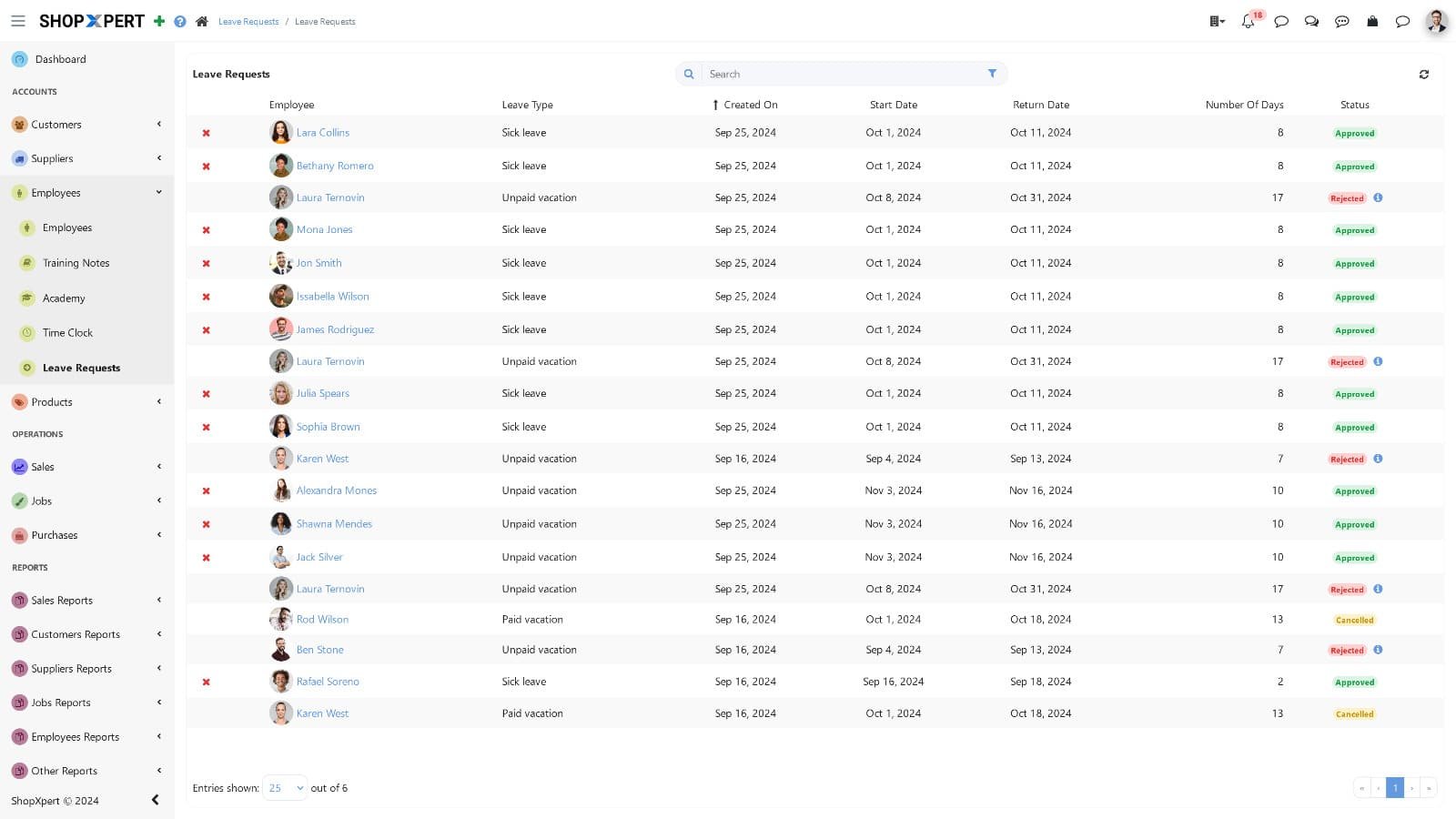
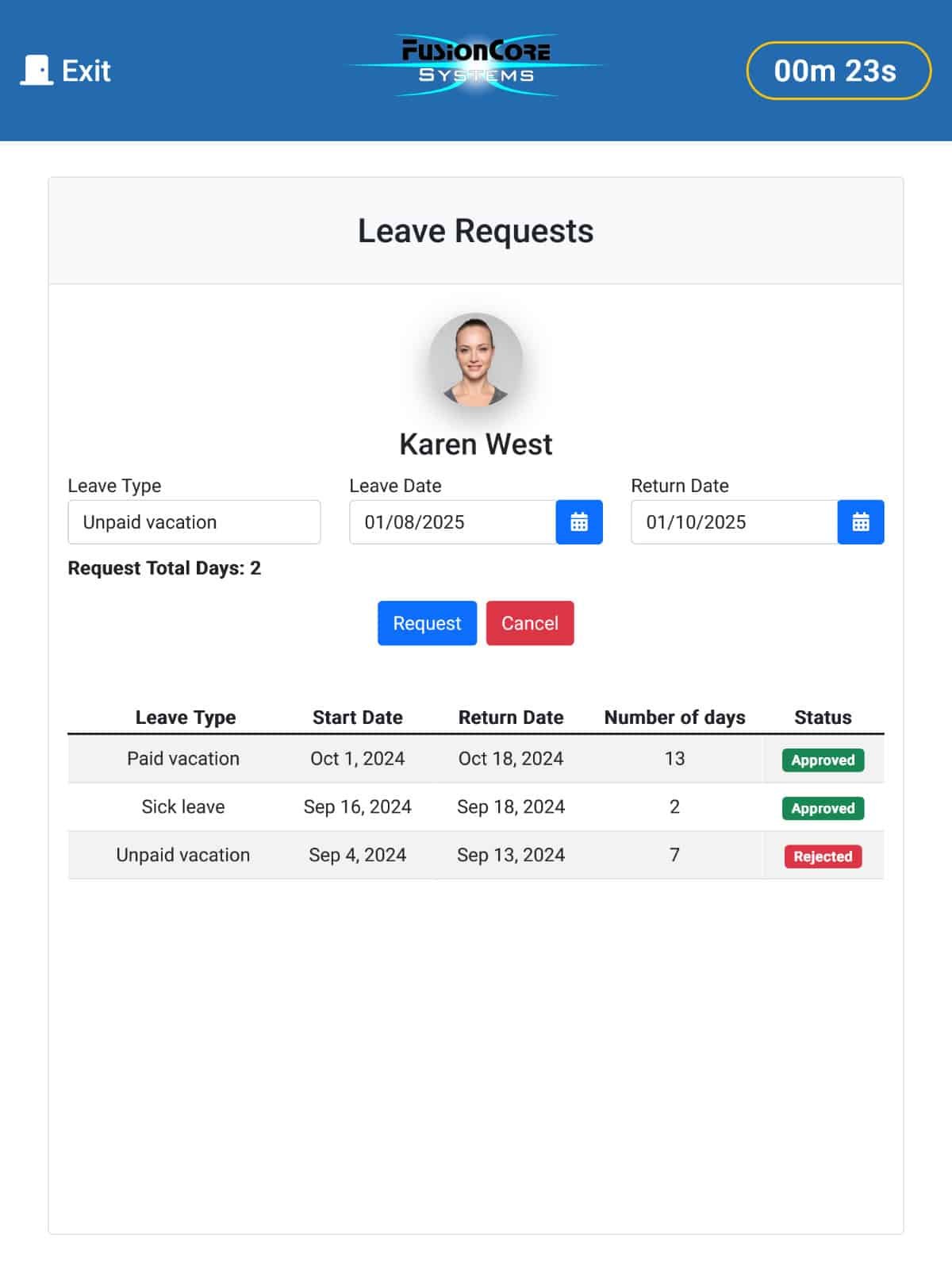
Leave Requests
ShopXpert leave request approvals list with statuses
Shifts and Leave

The problemThe shift plan is on a whiteboard, and leave requests are approved in the hallway.

Shifts, Leave, and Approvals in One Calendar.

Plan shifts on a calendar, so everyone knows when they work. Employees request paid, sick, or unpaid leave from their portal, and managers approve or reject it with leave history and balances in view.

Every decision is recorded, so there is no argument about what was approved.

  • Shift scheduling calendar
  • Paid, sick, and unpaid leave requests
  • Approve or reject with history
  • Leave balances per employee
Employee Portal

The problemEmployees ask the office how many hours they worked and how much leave they have left.

Give Every Employee Their Own Hours and Requests.

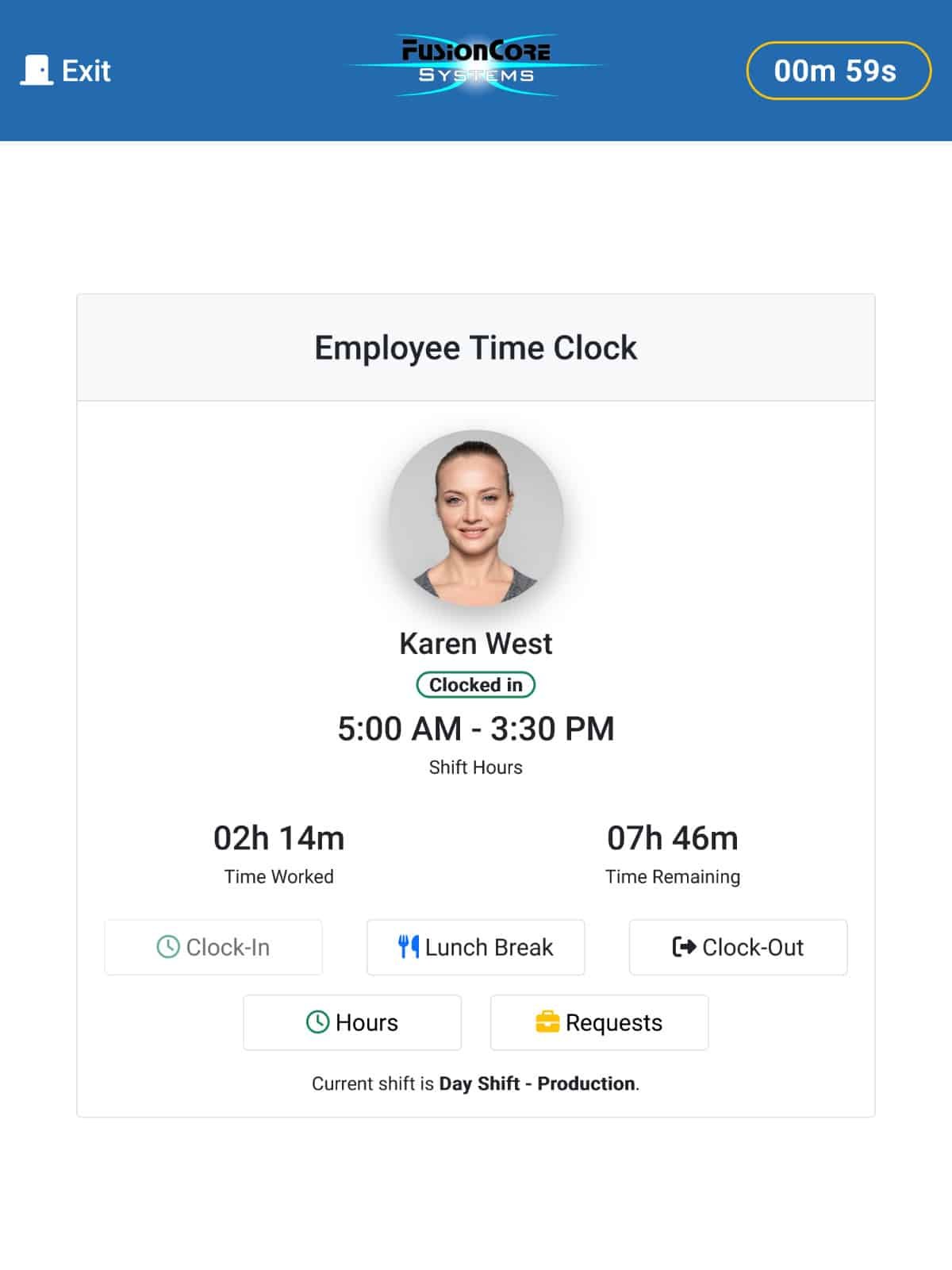
In the Employee Portal, employees clock in, take a lunch break, and clock out, and see time worked and time remaining in their current shift.

They check their own hours, overtime, attendance, schedule, and pay days, and send leave requests without a trip to the office.

  • Clock in, lunch break, and clock out
  • Time worked and time remaining
  • Own hours, overtime, and schedule
  • Leave requests with status
Employee Portal
ShopXpert Employee Portal time clock with clock in, lunch break, and clock out
Leave
ShopXpert Employee Portal leave request form and history
Time Report
ShopXpert time and pay report with normal time, overtime tiers, rates, and total pay
Job Time and Reports

The problemPayroll hours and job hours never match, so nobody trusts either.

Job Time at the Workstation, Pay Reports in One Click.

At the workstation, operators log in with their badge, open the job by card or serial number, and start and finish stages and tasks with a running timer. Time flows straight into job costing.

Time reports show normal work time, first and second tier overtime, rates, and total pay by employee, ready to export as PDF.

  • Badge login at the workstation
  • Start and finish timers on tasks
  • Overtime tiers, rates, and pay
  • PDF time reports
How It Works

One Shift, Recorded as It Happens.

Attendance and job time come from the same badge, the same day.

01

Clock InEmployees badge in at the time clock tablet.

02

Work the JobOperators log time on jobs and tasks at the workstation.

03

Breaks and LeaveBreaks are recorded, and leave is requested and approved in the app.

04

ReportHours, overtime, and pay are ready in a PDF report.

TIME CLOCK · TODAYDay Shift · Milling Department6:008:0010:0012:002:00BSB. StoneMCM. ChenJRJ. RiveraAPA. PatelJob timeSetup / tasksBreakTime captured where work happensClock-ins, breaks, and job time without timesheets.
What Changes

What Employee Time Tracking Changes.

Accurate hours for payroll, and accurate labor for every job.

No More Timesheets

Hours are recorded as employees work.

Accurate Labor Costs

Job time feeds job costing directly.

Faster Payroll Prep

Overtime and pay are calculated in the report.

Fewer Disputes

Clock-ins, breaks, and approvals are all on record.

FAQ

Employee Time Tracking Questions.

Want to see the time clock running? Talk to our team.

What is employee time tracking software?

Employee time tracking software records when employees work, take breaks, and take leave, and calculates hours and overtime. ShopXpert also records time against jobs, so the same data serves payroll and replaces paper timesheets.

How do employees clock in?

Employees scan an RFID badge at a time clock tablet, or clock in from the Employee Portal.

Does ShopXpert calculate overtime?

Yes. Time reports show normal work time and two tiers of overtime, each with rate and pay, plus total pay.

Can employees request leave?

Yes. Employees request paid, sick, or unpaid leave in the Employee Portal, and managers approve or reject it with history and balances.

Is job time connected to job costing?

Yes. Operators record time on jobs and tasks at the workstation, and that labor flows into job costing in ShopXpert.

Workforce and Time Tracking

Know Who Worked, When, and on What.

See badge clock-in, leave, and job time working together in ShopXpert.