
A customer sends an RFQ for 400 parts due in five weeks. Your estimator can price it in an hour. The harder question is whether the shop can actually make it on time without pushing three other jobs late. In many shops, the answer comes from the owner walking the floor.
Capacity planning gives you a better answer. This guide covers how to measure the capacity you really have, compare it with the work you have promised, and decide what to do when the numbers do not fit.
What Capacity Planning Means in a Machine Shop
Capacity planning is comparing the hours of work you have committed to against the hours your machines and people can actually deliver, over a period of time. It looks weeks ahead and asks a simple question: do we have enough of the right machines, people, and shifts to finish this work by the dates we promised?
It is related to scheduling, but it is not the same thing. Scheduling decides which job runs on which machine and in what order today and this week. Capacity planning decides whether the total load fits at all, and what you need to change if it does not. If you want the scheduling side, our guide to job shop scheduling software covers it in detail.
Why Capacity Is Hard to See in a Job Shop
A production line makes the same thing all day, so its capacity is easy to state. A job shop is different:
- Every job has a different routing. One job needs the saw, two mill operations, and the CMM. The next one skips the mill and goes to the lathe.
- Setup time changes with the mix. Ten small jobs can use more machine time than one large job with the same run hours.
- The constraint moves. This month the 5-axis mill is the bottleneck. Next month it is final inspection or a single programmer.
- People are part of capacity. A machine with no qualified operator on second shift has no capacity on second shift.
- Outside processing adds wait time. Heat treat, plating, and anodize do not use your machines, but they still use calendar days.
Step 1: Measure the Capacity You Really Have
Start with available hours for each machine or work center. For each one, take the shift hours you plan to run, then subtract planned maintenance, meetings, and the time nobody is assigned to it. That gives you planned available hours.
Planned hours are not the same as productive hours. A machine that is scheduled for a full shift still spends time idle while waiting for material, a program, a first article sign off, or an operator who is covering two machines. The most honest number comes from measuring how much time each machine actually spends running. Our article on CNC machine monitoring explains how shops capture running, idle, and downtime without guessing.
Do the same for people. Count who is qualified to run each work center on each shift, and account for planned leave. A shop with three lathes and one experienced lathe operator on second shift has one lathe of capacity on second shift.
Step 2: Measure the Load You Have Promised
Load is the work already committed. For every open job, add up the setup and run hours for each operation, grouped by the machine or work center that will do it. Use the hours from your routings and estimates, and adjust them with actual times from past runs of the same part when you have them.
Then spread that load over time, based on each job’s due date and the order its operations must happen in. A job due in four weeks with a two week plating step does not need machine time in week four. It needs it in week one or two.
Step 3: Compare Load to Capacity and Find the Bottleneck
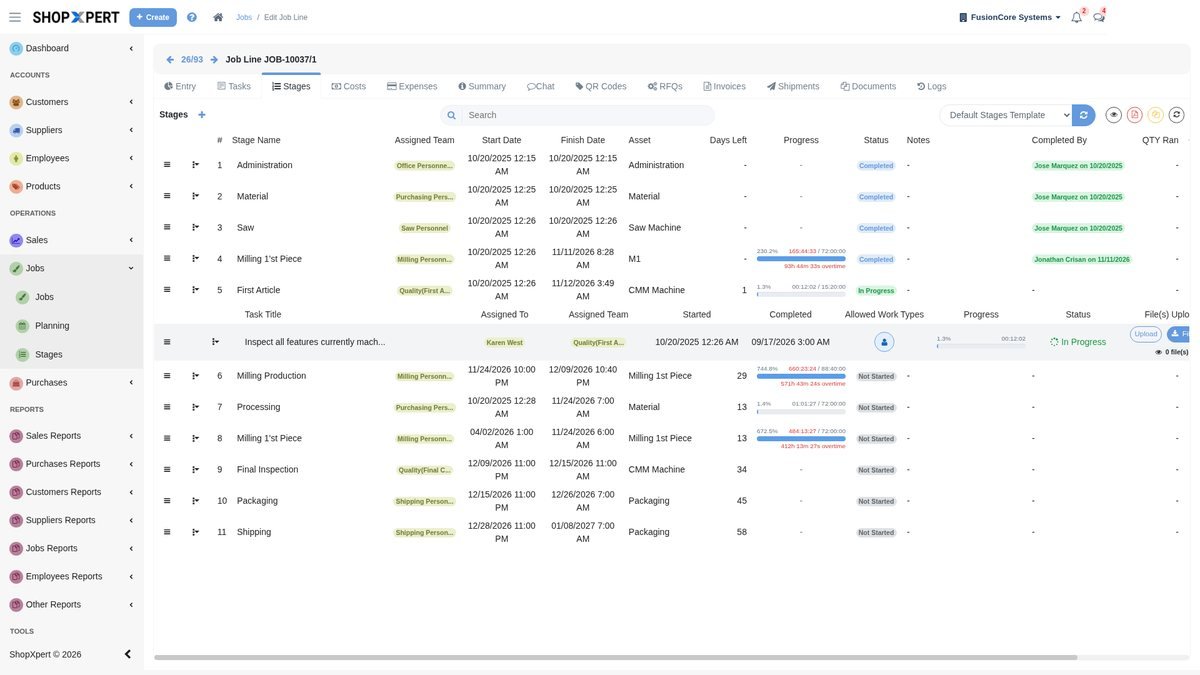
Lay the load next to the capacity for each work center, week by week. Most work centers will have room. One or two will not. That overloaded work center is your bottleneck, and it sets the pace for the whole shop.
A worked example makes this concrete. Say your 5-axis mill runs one 10-hour shift, five days a week, so it has 50 planned hours a week. If the open jobs that need it add up to 70 hours over the next week, you are short 20 hours on that machine, even if every other machine in the building has spare time. Adding a new job that also needs the 5-axis mill will make other jobs late unless something changes.
Pay attention to work centers people forget. Inspection, deburr, and programming are often the real constraint because nobody counts their hours.
Step 4: Decide What to Do When Load Exceeds Capacity
Once you see a gap, you have options, and each one has a cost:
- Add hours. Run overtime, a Saturday, or a second shift on the bottleneck only.
- Move work. Route operations to a different machine that can hold the tolerance, even if it is slower.
- Reduce setup time. Group jobs that share fixtures, material, or tooling so the bottleneck spends more of its day cutting.
- Send work out. Outsource an operation to a trusted supplier to free up your own machines.
- Change the promise. Talk with the customer about a split shipment or a later date before the job is late, not after.
- Invest. When the same work center is overloaded month after month, that is the case for a new machine or a new hire.
Step 5: Use Capacity When You Quote
Capacity planning pays off most at the quoting stage. Before you commit to a delivery date, check the load on the work centers the new job needs during the weeks it would run there. If the bottleneck is full, either quote a later date or plan the overtime and price it in.
Common Capacity Planning Mistakes
- Planning from 100 percent of shift hours, as if machines never wait.
- Ignoring setup time when the job mix has many small orders.
- Counting machines but not the people qualified to run them.
- Leaving inspection and programming out of the plan.
- Updating the plan once a month while the floor changes every day.
- Never comparing planned hours to actual hours, so the same estimating errors repeat.
How ShopXpert Helps With Capacity Planning
ShopXpert has been building shop management software for machine shops since 2020. Capacity planning in ShopXpert draws on the same records you already use to run jobs:
- Planning on a Gantt board. Drag jobs on a Gantt board, and ShopXpert sets start and end times from machine and employee availability. You can link dependent steps, compare planned against actual, and use the bottleneck view to spot problems before they stop the floor.
- Jobs with stages and deadlines. Jobs start from templates with stages and tasks already assigned, with priorities and deadlines for each stage and views for what is due today, this week, and overdue.
- Measured machine time. XpertTrack sensors show running, idle, downtime, and offline time for each machine, and the Asset Usage dashboard keeps that history so you can plan capacity on real numbers. It works on CMMs and robot cells too, which are often the hidden bottleneck.
- Shifts and leave. The shift calendar and leave requests show who is available to work, and the Time Clock and workstations record actual labor on each job.
- Outside capacity. Outsource management links outside operations to the job, and suppliers can share their open capacity through the Supplier Portal.
See how Jobs, Workstation, Tasks, and Planning fit together on the ShopXpert production management page. The machine tracking page shows how XpertTrack measures machine utilization, the workforce and time tracking page covers shifts and leave, and supplier and outsource management shows how outside work is tracked.
Know Your Capacity Before You Commit
Bring a few of your current jobs and your machine list, and we will show you how ShopXpert would lay out your load, your capacity, and your bottleneck. Book a ShopXpert demo.